

ArtArch 新闻中心
AI Video TechniquesHow to Write AI Video Insert Shot Prompts
Learn how AI video insert shot prompts connect clues, environmental changes, sound, reactions, and motivated actions in a short sequence.
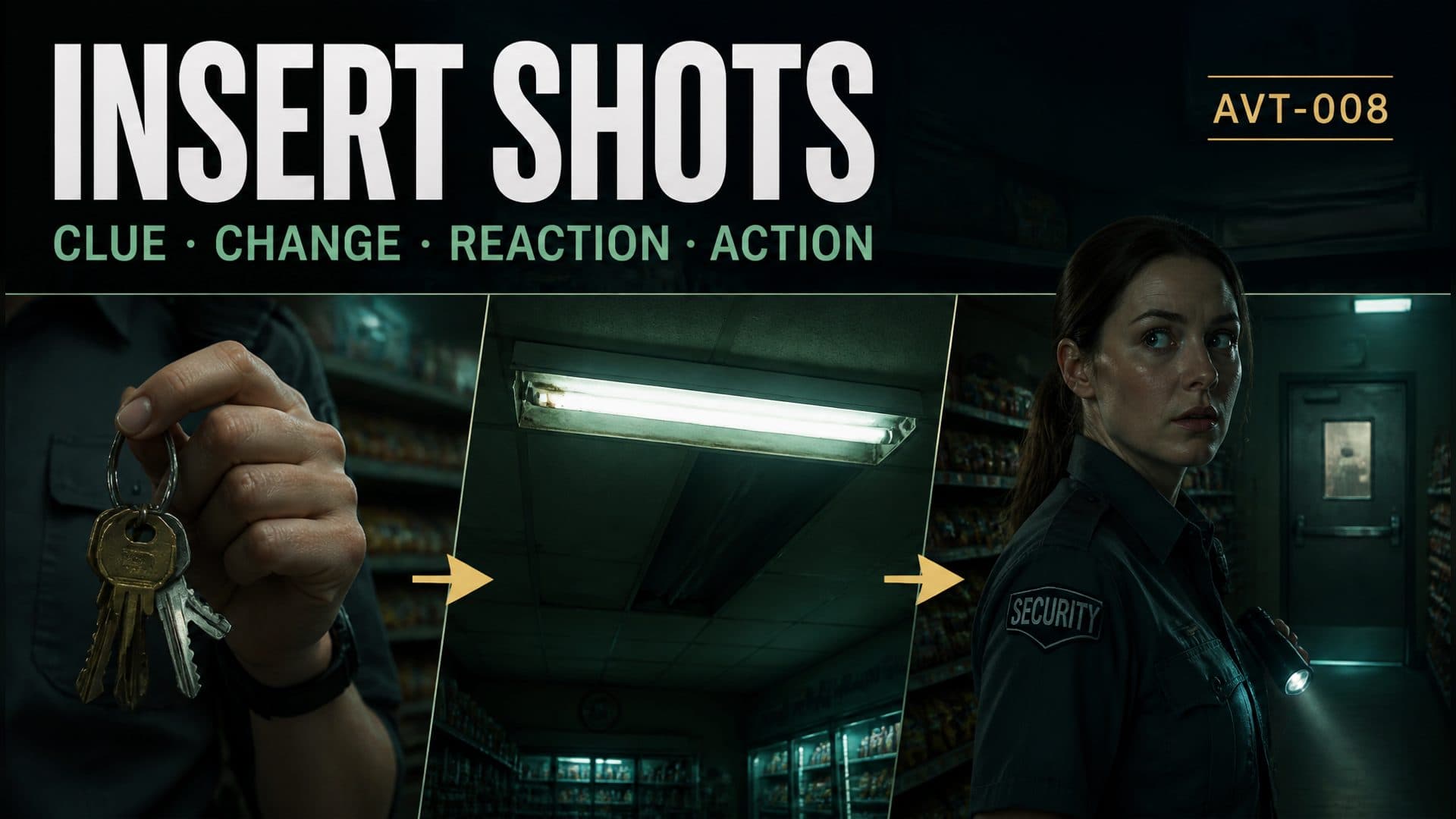
Provide a character reference and an empty environment reference to create a suspenseful AI video where every insert shot reveals information and changes the character’s next action. This AVT-008 experiment follows a night security guard inside a closed neighborhood grocery store as keys move in her hand, the store layout is established, a ceiling light fails, and she turns toward a rear storage door.
The scene uses inserts as causal links. A close detail sets up an object, an environmental insert introduces a problem, a reaction confirms that the character noticed it, and the final movement carries the story forward.
An insert shot should change what the viewer knows
An insert is a close or isolated view placed inside a wider sequence. Its value comes from new information. In this scene, the keys establish what the guard is holding, while the fluorescent fixture reveals an electrical disturbance. Both details connect to actions before and after the cut.
A useful insert can perform one of four jobs:
- introduce an important object;
- reveal a change in the environment;
- clarify the source of a sound;
- show the detail that motivates a reaction or decision.
The surrounding shots should prepare the insert and respond to it.
The broad suspense prompt
The control version describes the event in one continuous idea:
A night security guard patrols a closed grocery store, notices something unusual in the rear, and turns toward the storage door. Show the character and environment with a tense atmosphere.
This creates the situation. The cause of the unusual event, the object in her hand, and the exact reaction chain remain open.
The information-driven insert sequence
The technique version assigns a narrative job to each time range:
From 0–1.5 seconds, show a close insert of ordinary keys in the guard’s right hand, moving slightly. From 1.5–3.5 seconds, cut wide to establish her position left of the checkout counter and the storage door at rear right. From 3.5–5 seconds, insert the old fluorescent fixture overhead as it flickers twice and half of it goes dark with a distinct electrical sound. From 5–6.5 seconds, cut to her reaction: she stops, shifts her eyes toward rear right, then slowly turns her head. From 6.5–8 seconds, return to a medium shot as she takes one step toward the storage door.
The sequence creates a readable chain:
object setup → spatial map → environmental change → perception → decision → action
Start with a controlled detail
The keys introduce the guard through an object before revealing the whole store. The right-hand relationship matters because the keys may return later in the story. A small natural swing gives the detail motion while preserving its identity and holder.
Starting close also withholds geography for a moment. The next wide shot then answers where she is and where the potential threat may be.
Re-establish space before the event
The wider shot places the guard on the left near the checkout counter and the storage door at rear right. This screen geography prepares the direction of her later gaze and step.
Spatial setup makes the reaction easier to understand. When her eyes move toward rear right, the audience already knows what occupies that zone.
Make the environmental insert specific
The ceiling light insert has a defined subject, count, visual change, and sound:
- an old fluorescent fixture;
- two consecutive flickers;
- half the fixture goes dark;
- one clear electrical crackle accompanies the failure.
This event changes the store’s lighting state and gives the guard a reason to stop.
Connect sound, gaze, and reaction
The reaction follows a natural order. The guard first stops walking, then shifts her eyes, then turns her head. The body responds after perception begins.
This short progression helps avoid a sudden full-body turn. It also makes the insert feel connected to a human point of view: the fixture changes, she hears it, locates it, and redirects attention toward the rear of the store.
End with a consequence
The last shot returns to a medium view and adds one controlled step toward the storage door. The insert sequence has now affected behavior.
That final action is small enough to finish within the remaining time. It opens the next beat while giving this eight-second sequence a complete mini-arc.
A reusable insert-shot template
[Duration] sequence in [location]. Every insert must reveal new story information.

[Opening time] object insert:
Show [object] held by [character and hand]. Use [small motion]. Preserve appearance, holder, and orientation.

[Establishing time] spatial shot:
Place the character at [foreground landmark] and the destination or threat at [screen direction and depth].

[Event time] environmental insert:
Show [specific environmental element] changing through [counted visible action], synchronized with [sound].

[Reaction time] close shot:
Character stops [current action], moves eyes toward [direction], then turns head or body with a short delay.

[Ending time] consequence:
Return to [shot size]. Character performs [one motivated next action] toward [destination]. Preserve object and spatial continuity.
Where insert shots help
A suspense creator can reveal a lock, warning light, empty shelf, footprint, or moving curtain before a character reacts. A product creator can insert a button press, material detail, indicator change, or connection point before showing the result. A cooking creator can show texture, temperature, or timing details that explain the next step. A social storyteller can compress a complete cause-and-effect beat into a few precise shots.
Use a clean character reference and an empty environment with the key landmarks already visible. Important objects should have simple shapes and stable positions.
Frequently asked questions
How many inserts fit into an eight-second video?
One or two focused inserts work well when the sequence also needs room for geography, reaction, and consequence.
What makes an insert meaningful?
It reveals an object, change, sound source, or clue that affects how the audience understands the next shot.
Should the character appear in every insert?
Use only the body part needed to establish ownership, such as a hand holding keys. Environmental inserts can focus entirely on the changing element.
How do I connect an insert to the next action?
Describe the perception order—sound, eyes, head, body—then end with one small motivated action.
Click the template card on this page, enter the experience page, and try the AI video insert shot prompt workflow with your own suspense or product sequence.
继续探索
更多 AI Video Techniques 内容

Motivated Cut AI Video Continuity: Change the Shot for a Reason
Learn how a visible action trigger, clear shot-size change, and locked screen direction create more intentional same-scene AI video edits.

Deep Depth of Field AI Video: Keep Every Story Layer Readable
Learn how deep depth of field AI video prompts keep foreground tools, central action, and distant location cues readable in one layered shot.

Medium Depth of Field AI Video: Balance Subject and Setting
Learn how medium depth of field AI video prompts keep hands and active objects readable while preserving recognizable environmental context.

AI Video Character Reference Framing: Match Portraits to Landscape Shots
Prepare vertical character portraits for landscape AI video by matching aspect ratio, body scale, headroom, floor space, and movement room before generation.