

ArtArch 新闻中心
AI Video TechniquesAI Video 180 Degree Rule Prompts: A Shot-Reverse-Shot A/B Test
Learn how to write AI video 180 degree rule prompts with a relationship line, fixed screen direction, over-the-shoulder framing, and timed shot changes.
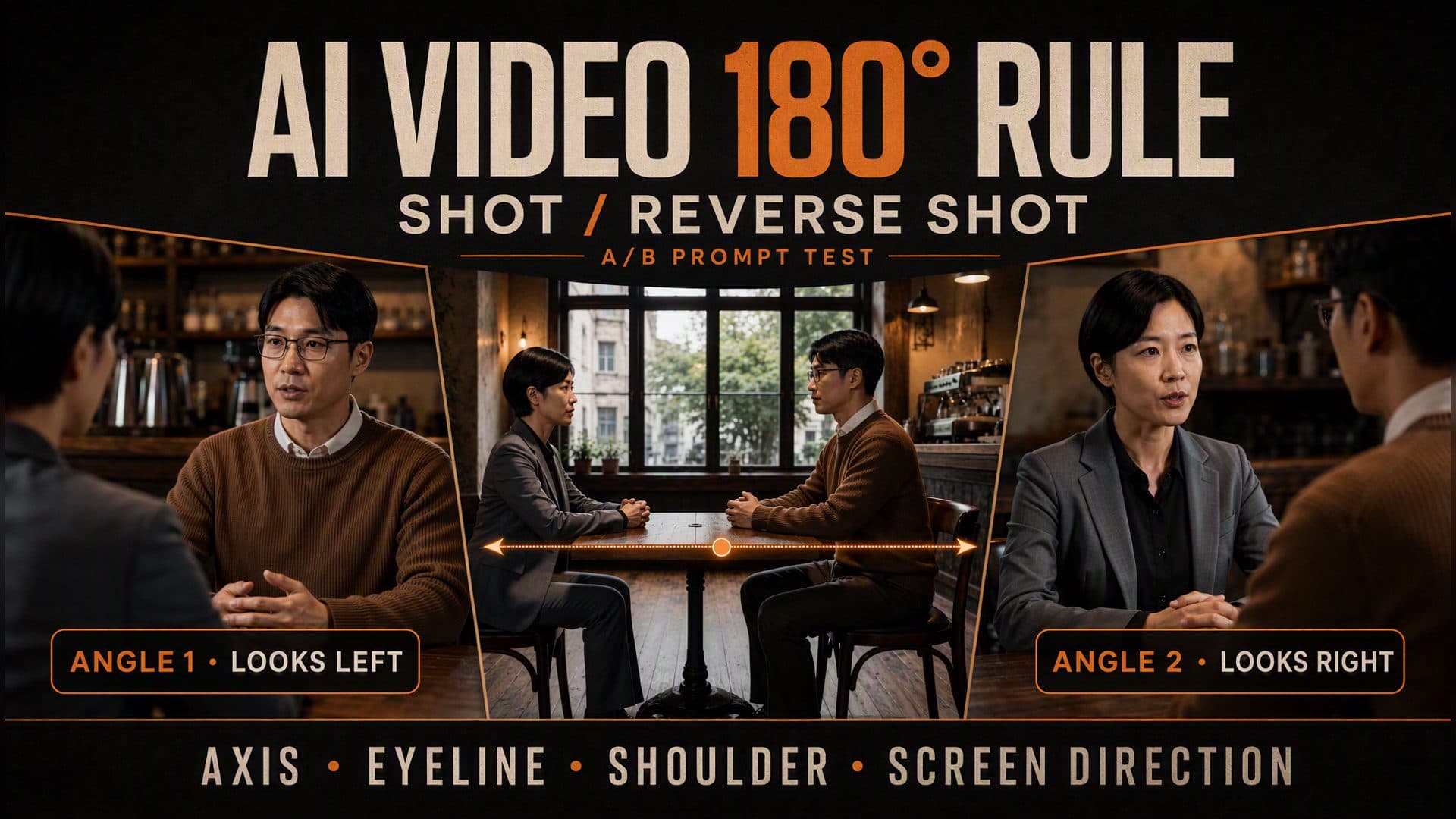
AI video 180 degree rule prompts work best when they describe a visible screen relationship instead of naming a film-school rule and leaving the model to interpret it. In AVT-006, two people sit across a café table. The prompt fixes who stays on the left, who stays on the right, where each person looks, which shoulder enters the foreground, and when the edit changes angle.
We tested a short control prompt against a structured axis prompt. Both eight-second videos use the same two-character reference and the same empty café. Both begin with a two-shot, move behind the woman to frame the man, and finish behind the man to frame the woman. The structured version turns that sequence into timed, reviewable instructions.
The shared setup
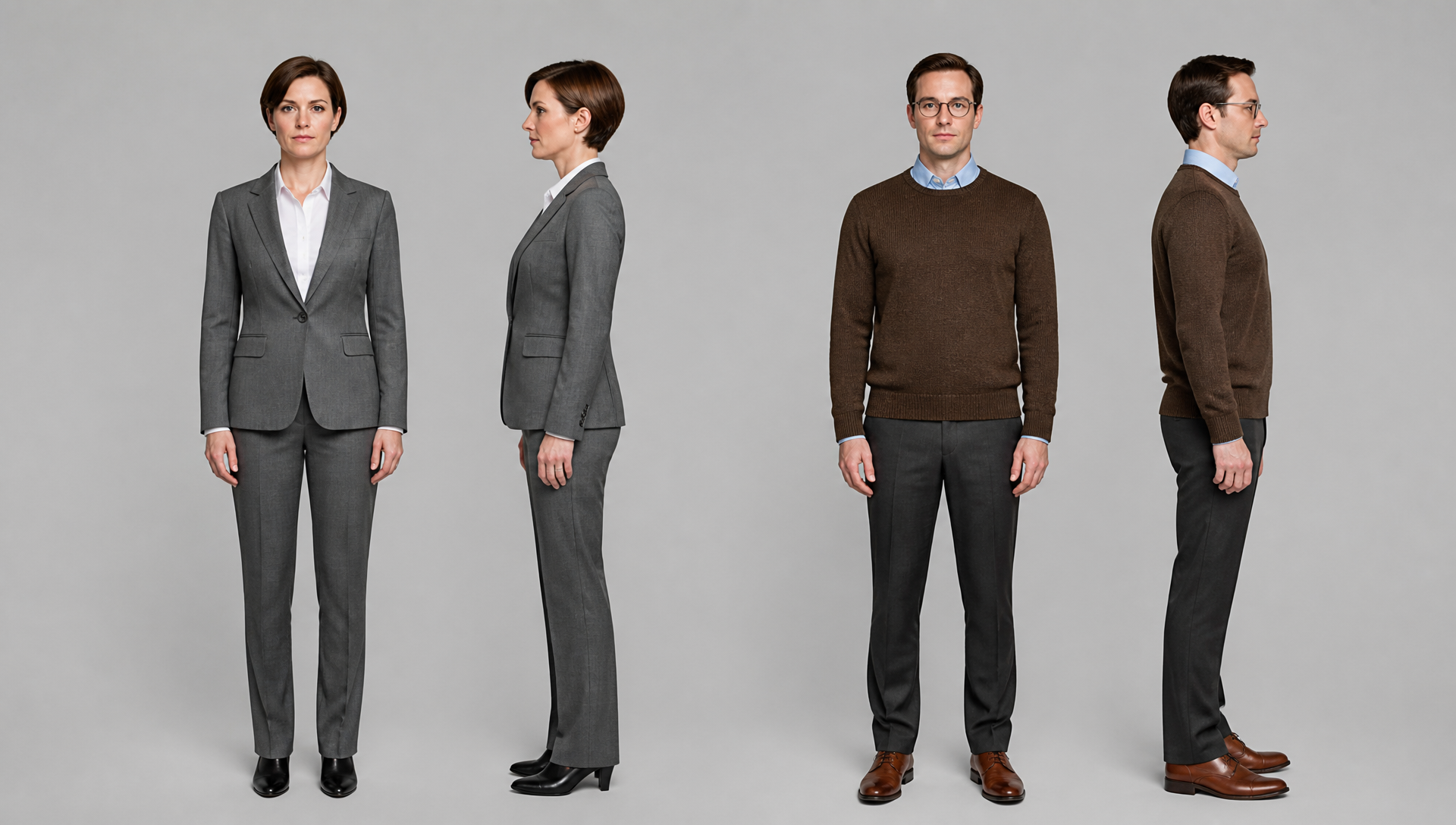
The character reference separates the two roles clearly: a short-haired woman in a gray suit and a man in glasses wearing a brown sweater.
The environment reference provides an empty café with a small central table, two facing chairs, a window behind the table, and the counter on one side. The empty plate lets the video prompt decide where each character sits.

| Test condition | Version A: control | Version B: structured axis prompt |
|---|---|---|
| Video model | Seedance 2.0 Fast | Seedance 2.0 Fast |
| References | Same characters and café | Same characters and café |
| Duration | 8 seconds | 8 seconds |
| Output | 720p, 16:9 | 720p, 16:9 |
| Generated audio | On, no spoken dialogue requested | Same |
| Seed | Open | Open |
| Shot plan | Two-shot, then two over-the-shoulder close shots | Fixed axis side, screen direction, shoulders, subjects, and timing |
Open the AVT-006 workflow to inspect both prompts and all extracted frames. Watch the complete control video and structured axis video to see how each edit develops.
Start by establishing the screen relationship
At the opening of both videos, the woman sits on the left and looks right. The man sits on the right and looks left. Their eye lines meet across the table.

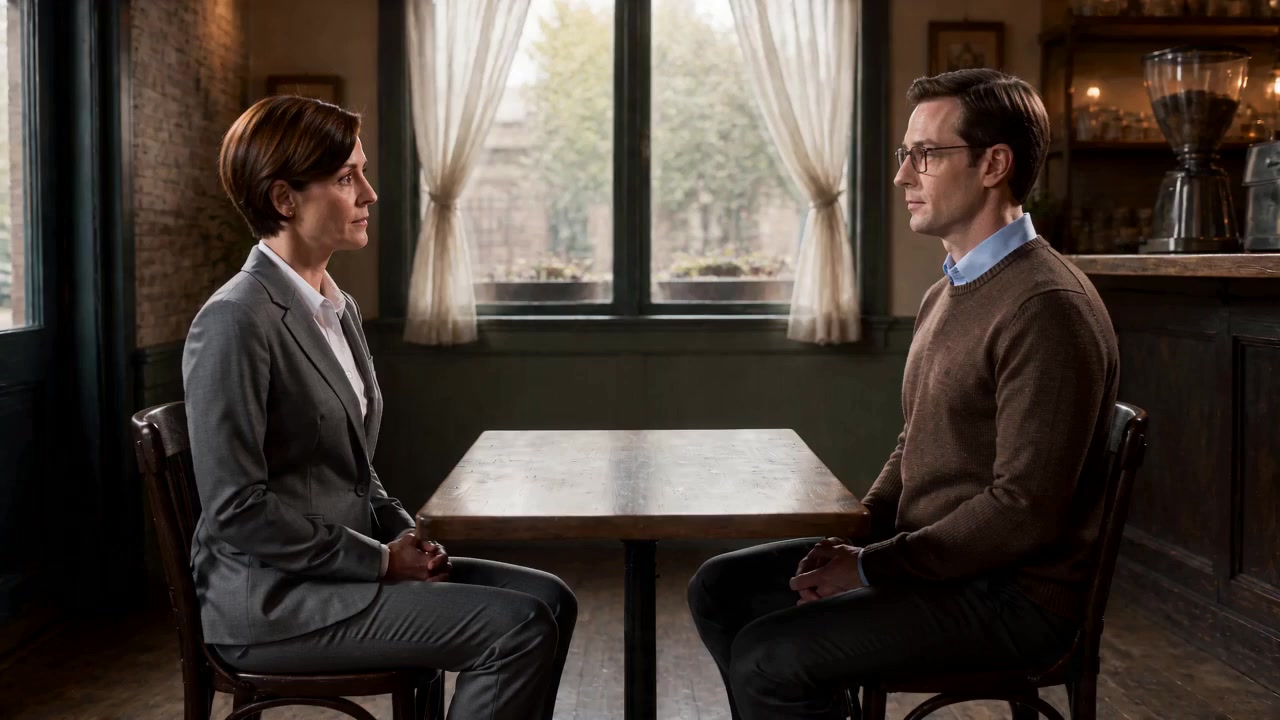
This two-shot gives the sequence a map. Imagine a relationship line running between the two faces. The structured prompt keeps every later camera position on the counter side of that line. From those positions, the woman should remain associated with screen left and the man with screen right.
The control prompt only says:
Show a two-shot, then cut to an over-the-shoulder close shot
of each person. Keep a natural spatial relationship.
It describes the shot types but leaves the camera side, foreground shoulder, subject position, and cut timing open.
First reverse angle: frame the man from behind the woman
The first close angle places part of the woman's head and gray shoulder in the left foreground. The man remains the clear subject on the right and looks back toward screen left.


The structured prompt writes the geometry directly:
From 2 to 5 seconds, shoot from behind the woman's left shoulder.
Her shoulder occupies only a small area of the left foreground.
The man is the main subject on the right and looks toward screen left.
Do not let the foreground shoulder cover his face.
Four details do the work: time range, shoulder side, subject side, and gaze direction. “Over the woman's shoulder” alone does not specify all four.
Second reverse angle: frame the woman from behind the man
The reverse shot moves behind the man's right shoulder. He now appears in the right foreground while the woman remains the subject on the left, looking toward screen right.

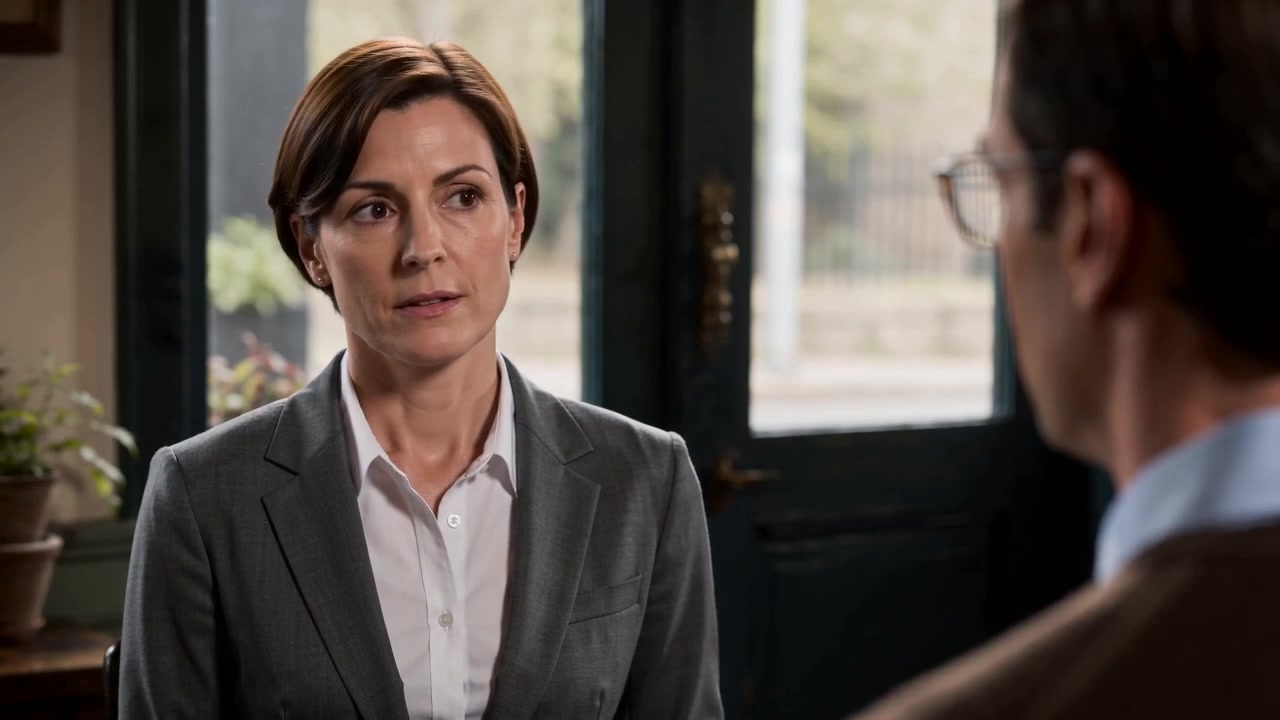
From 5 to 8 seconds, shoot from behind the man's right shoulder.
His shoulder occupies only a small area of the right foreground.
The woman is the main subject on the left and looks toward screen right.
Keep the table, chairs, and character sides stable.
The two close shots are complementary. Left foreground points toward a subject on the right. Right foreground points toward a subject on the left. Their gaze directions aim back into the conversation rather than away from it.
What this A/B pair supports
Both versions produced a readable shot-reverse-shot sequence in this sample. Both preserved the opening left-right relationship, used the correct opposing shoulders, and maintained complementary eye lines.
The structured prompt did not rescue a failed control clip. Its value is operational. A reviewer can check whether the 0-to-2-second two-shot happened, whether the first shoulder remained on the left, whether the second shoulder moved to the right, and whether each subject kept the expected gaze direction.
That distinction matters when a workflow has to be repeated. “Natural spatial relationship” is difficult to score. “Woman left looking right; man right looking left” is simple to score and easy to correct.
This remains one A/B generation with open seeds. It shows that explicit axis language can organize the request and its review. It does not prove that a short prompt will fail or that every model will follow the same camera plan.
Translate the 180 degree rule into prompt fields
The 180 degree rule becomes easier to use when you split it into six visible fields.
| Field | Question to answer | AVT-006 instruction |
|---|---|---|
| Relationship line | What connects the two subjects? | The line between the two faces across the table |
| Camera side | Which side is legal? | The side nearer the café counter |
| Screen position | Who owns each side? | Woman left, man right |
| Eye line | Where does each person look? | Woman right, man left |
| Foreground shoulder | Which shoulder marks each reverse angle? | Woman on left foreground, man on right foreground |
| Timing | When does each view appear? | 0–2, 2–5, and 5–8 seconds |
You do not need to use the phrase “180 degree rule” if these six fields are present. The geometry matters more than the label.
Write the axis before writing the cuts
Start with a two-line spatial contract:
Person A sits on screen left and looks right.
Person B sits on screen right and looks left.
All camera positions stay on the same side of the relationship line.
Then assign the shots. This order prevents each angle from becoming a separate, self-contained request with no shared screen map.
For scenes with more movement, update the relationship line only after the blocking changes. If one person stands and walks around the table, the old line may no longer describe the scene. Use a neutral two-shot or a visible camera move to establish the new geography before cutting again.
Control the foreground shoulder
An over-the-shoulder shot contains two subjects with different jobs. The foreground person supplies orientation. The background person carries the performance.
Specify the foreground shoulder by character and screen side:
The woman's gray shoulder stays in the left foreground,
soft and small, without covering the man's eyes or mouth.
This is safer than asking for “a cinematic shoulder foreground.” Without a side and owner, the model can choose the wrong shoulder or let the foreground face dominate the frame.
Keep eye lines complementary
The subject in each close shot should look toward the other person's screen position.
Man on screen right looks left.
Woman on screen left looks right.
If both people look in the same screen direction, the edit can make them seem to face parallel rather than toward each other. A clear gaze instruction also helps when the foreground shoulder is soft or partially cropped.
Give each edit a time window
An eight-second clip has little room for a three-shot dialogue pattern. Broad sequencing words such as “first,” “then,” and “finally” leave the duration of each angle open.
AVT-006 divides the clip into:
0–2 seconds: two-shot establishes the relationship.
2–5 seconds: over the woman's left shoulder, man is the subject.
5–8 seconds: over the man's right shoulder, woman is the subject.
The two-shot is shorter because it only needs to establish the map. Each close angle receives three seconds for a readable look or reaction.
Reusable shot-reverse-shot prompt
Create one continuous [duration] dialogue sequence with [Person A]
and [Person B] seated or standing across [shared object or space].

RELATIONSHIP LINE
The relationship line runs from [Person A] to [Person B].
Keep every camera position on the [named environment landmark] side of the line.

SCREEN DIRECTION
[Person A] remains on screen left and looks right.
[Person B] remains on screen right and looks left.
Do not mirror the characters or exchange their screen positions.

[TIME RANGE 1]: ESTABLISHING VIEW
Use a [wide or medium] two-shot showing both people and the shared geography.

[TIME RANGE 2]: PERSON B
Shoot from behind [Person A]'s [left/right] shoulder.
Keep that shoulder small in the [left/right] foreground.
[Person B] stays on [screen side], looks [direction], and remains unobstructed.

[TIME RANGE 3]: PERSON A
Shoot from behind [Person B]'s [left/right] shoulder.
Keep that shoulder small in the [left/right] foreground.
[Person A] stays on [screen side], looks [direction], and remains unobstructed.

CONTINUITY
Keep the table, chairs, background landmarks, wardrobe, and lighting stable.
Do not cross the relationship line without a visible transition or neutral shot.
How to review the finished sequence
Pull three frames: the establishing view, the first close angle, and the reverse close angle. The same three-frame audit works even when the clip contains no spoken dialogue.
Check seven items:
- The establishing view shows both subjects and their relationship.
- Person A owns the same screen side throughout.
- Person B owns the opposite side.
- Eye lines point toward each other.
- The first foreground shoulder appears on the planned side.
- The reverse shoulder appears on the opposite side.
- Neither shoulder hides the active subject's face.
If one item fails, revise that field instead of rewriting the whole prompt. A wrong shoulder needs a shoulder-side correction. A mirrored pair needs stronger screen-position constraints.
Common shot-reverse-shot mistakes
Naming the rule without defining the geometry
“Follow the 180 degree rule” does not tell the model where the line is or which side contains the camera. Add a physical landmark and screen positions.
Describing each shot independently
Three isolated shot descriptions can assign different screen maps. Write one relationship contract before the shot list and carry it through every angle.
Forgetting the foreground shoulder side
“Over her shoulder” leaves left and right open. State whose shoulder appears, where it sits in frame, and how much of the foreground it occupies.
Letting the shoulder cover the face
The shoulder is an orientation cue, not the subject. Keep it soft, partial, and away from the active person's eyes and mouth.
Switching sides without a transition
If the camera needs to cross the line, show the crossing move or insert a neutral shot on the line. A hidden jump to the other side reverses screen direction.
Frequently asked questions
What is the 180 degree rule in an AI video prompt?
It is a fixed screen relationship: define the line between the subjects, keep cameras on one side, and preserve opposing screen positions and eye lines across cuts.
Do I need an establishing shot before every reverse angle?
Not before every cut. Use one when the relationship begins, changes, or becomes unclear. The opening two-shot in AVT-006 gives both close angles a shared map.
Why does an over-the-shoulder shot sometimes feel reversed?
The model may choose the wrong foreground shoulder, mirror a character, or move the subject to the opposite screen side. Specify shoulder owner, shoulder side, subject side, and gaze direction together.
Can the camera cross the line?
Yes, when the audience can follow the change. Show a camera move across the line, use a shot on the line, or establish the new geography before continuing the reverse angles.
Should I use exact seconds?
Use time ranges when several angles must fit inside one generated clip. They make the intended order and duration easier to review, though generation can still drift.
Reuse the AVT-006 test
Open the AVT-006 shot-reverse-shot workflow, replace the characters and setting, then keep the same comparison: a concise shot list against a structured relationship line, screen direction, shoulder plan, and timeline.
继续探索
更多 AI Video Techniques 内容

Motivated Cut AI Video Continuity: Change the Shot for a Reason
Learn how a visible action trigger, clear shot-size change, and locked screen direction create more intentional same-scene AI video edits.

Deep Depth of Field AI Video: Keep Every Story Layer Readable
Learn how deep depth of field AI video prompts keep foreground tools, central action, and distant location cues readable in one layered shot.

Medium Depth of Field AI Video: Balance Subject and Setting
Learn how medium depth of field AI video prompts keep hands and active objects readable while preserving recognizable environmental context.

AI Video Character Reference Framing: Match Portraits to Landscape Shots
Prepare vertical character portraits for landscape AI video by matching aspect ratio, body scale, headroom, floor space, and movement room before generation.