

ArtArch Newsroom
AI Video TechniquesAI Photo Restoration Prompt Settings: Separate Instructions from Tool Controls
Structure AI photo restoration prompt settings by separating positive instructions, negative constraints, and verified tool controls for clearer restoration recipes.
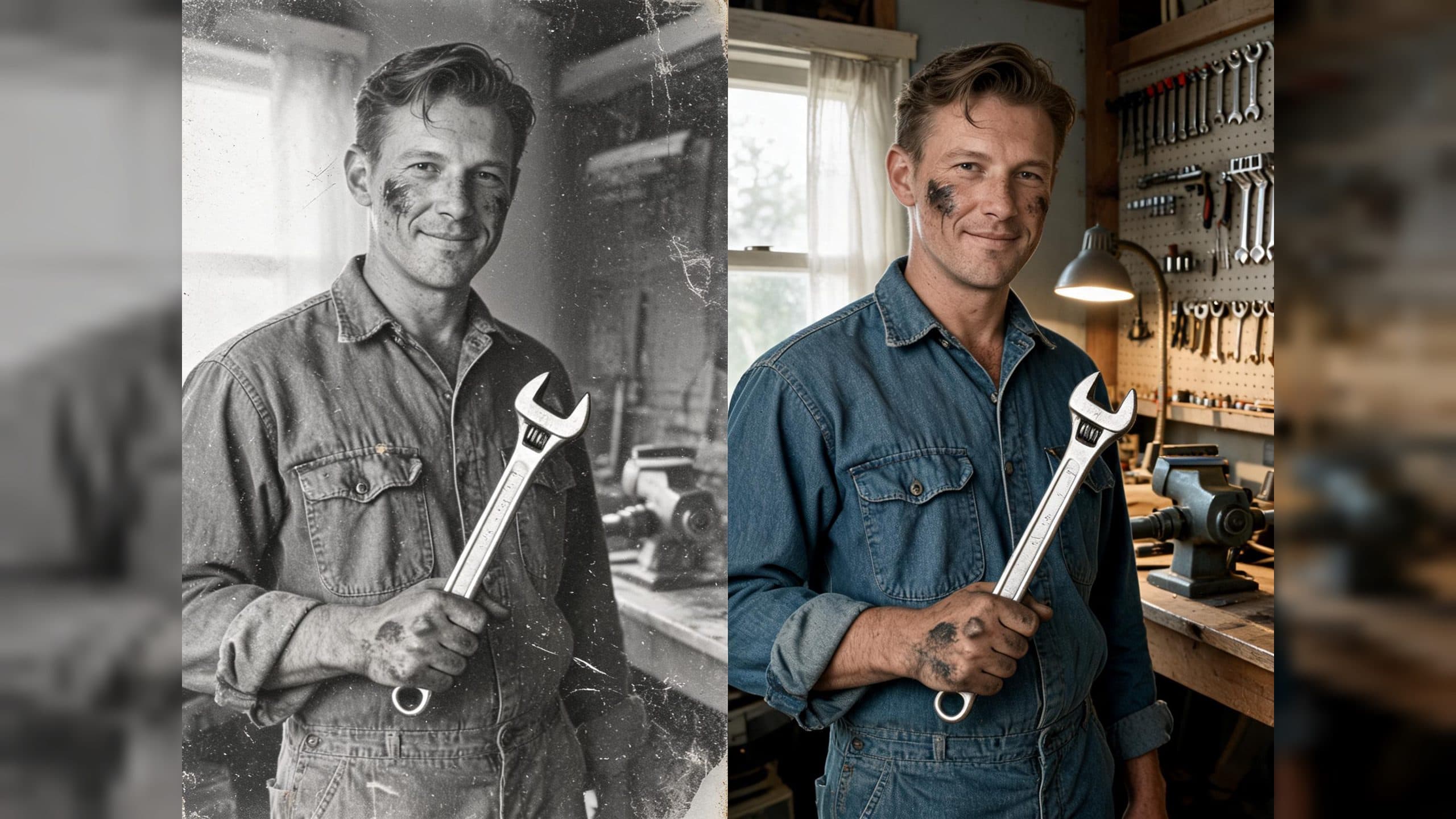
Upload a damaged portrait to create a cleaned, softly colorized archival image while keeping the person, framing, and period objects recognizable. Clear AI photo restoration prompt settings separate the visual instructions from the controls that the selected tool actually supports.
Give every instruction one job
Start with the task: restore and conservatively colorize the photograph. Follow it with a positive section naming the visible repairs and the details that should remain stable. Finish the text instructions with a negative section covering likely failure modes such as face redesign, changed hands, reframing, added objects, plastic skin, or excessive sharpening.
Keep operational controls in their own configuration area. Model choice, aspect ratio, and output resolution belong in verified tool fields. This separation makes it clear which decisions shape the image through language and which settings the tool executes directly.
A workshop portrait example
The test image shows a fictional 1950s American mechanic on the left, holding a wrench beside a six-tool pegboard, task lamp, window, workbench, and vise. The damaged print contains scratches, fold creases, stains, fading, grain, and a torn corner.
The positive instructions identify the man, apparent age, hairstyle, expression, hand position, coveralls, blank name patch, wrench, tool arrangement, window, bench, vise, crop, and viewpoint. The negative instructions protect those same anchors from redesign or replacement.
Use only verified settings
Parameter names travel poorly between image systems. A value such as steps, CFG, or denoise has meaning only when the chosen tool exposes that control and defines how it works. Check the available settings first, then place supported values in their actual fields.
In the single-image comparison, adding legacy parameter text to an otherwise identical restoration prompt produced no decisive visible advantage. Both outputs preserved the main identity and workshop structure. The practical benefit of separation is a recipe that can be checked, revised, and transferred without presenting inactive text as an executed setting.
Three useful creation scenes
A family archivist can separate face and keepsake preservation instructions from output size. A museum volunteer can lock period tools and architecture while recording the exact model and frame used for each test. A restoration educator can share a readable prompt recipe whose visual goals and software controls are easy to inspect independently.
A practical three-step flow
- List the identity, composition, objects, and surface damage visible in the scan.
- Write positive repair goals and negative prohibitions as separate instruction groups.
- Select only the model, aspect ratio, resolution, and other controls confirmed by the current tool.
Frequently asked questions
Keep exploring
More in AI Video Techniques

Motivated Cut AI Video Continuity: Change the Shot for a Reason
Learn how a visible action trigger, clear shot-size change, and locked screen direction create more intentional same-scene AI video edits.

Deep Depth of Field AI Video: Keep Every Story Layer Readable
Learn how deep depth of field AI video prompts keep foreground tools, central action, and distant location cues readable in one layered shot.

Medium Depth of Field AI Video: Balance Subject and Setting
Learn how medium depth of field AI video prompts keep hands and active objects readable while preserving recognizable environmental context.

AI Video Character Reference Framing: Match Portraits to Landscape Shots
Prepare vertical character portraits for landscape AI video by matching aspect ratio, body scale, headroom, floor space, and movement room before generation.