

ArtArch Newsroom
AI Video TechniquesAI Photo Restoration Identity Preservation: Use Three Constraint Lists
Restore a damaged family photograph with restrained color while preserving faces, poses, heirloom objects, and the original frame using three prompt constraint lists.
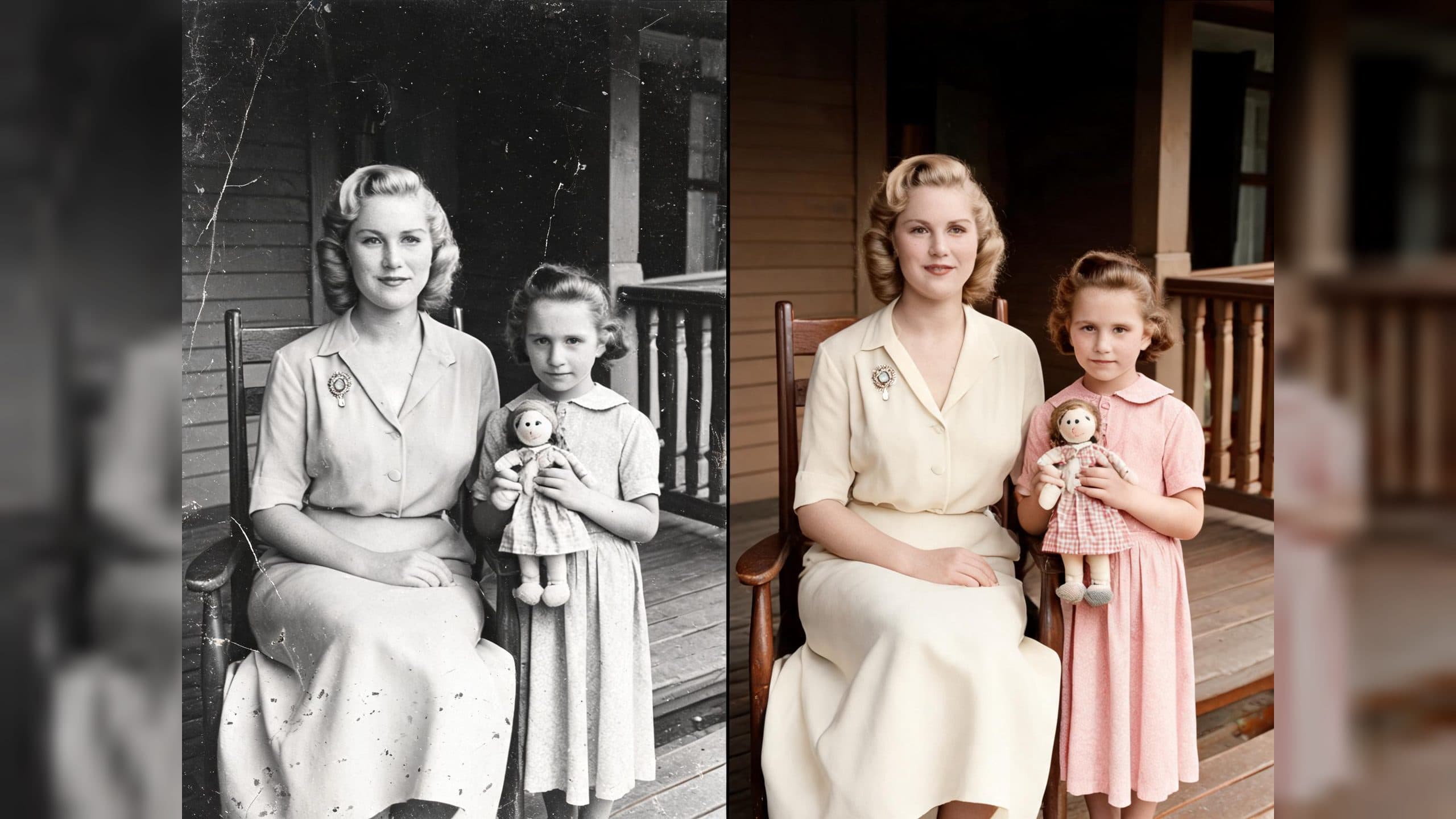
Upload a damaged family photograph to create a cleaned, softly colorized archival portrait while keeping the people, objects, and original framing recognizable. A three-list prompt gives the restoration a visible priority order: what must stay, what may be repaired, and what the edit must avoid.
What the restoration preserves
The workflow suits a portrait with identifiable faces, clothing, props, and architecture. In the test scene, a seated mother remains on the left and her daughter remains on the right, holding a cloth doll on a wooden porch. The oval brooch, chair, railing, clapboard wall, and screen door remain part of the composition.
The output uses restrained period color with an archival photographic grade. Skin texture, fabric, wood, and the photograph's subtle grain stay readable, preserving the feeling of an archival print.
The three-list prompt structure
Start with the restoration target: remove scratches, fold creases, stains, dust, fading, noise, and mild blur, then apply historically plausible color.
Next, write a Must Preserve list. Name identity, apparent age, hairstyle, expression, pose, hand placement, object positions, crop, and camera viewpoint. Concrete nouns give the edit a checklist it can revisit.
Then add Only Allowed Repairs. Limit reconstruction to small damaged areas supported by adjacent visible evidence, and specify restrained color, natural skin texture, and subtle grain.
Finish with Absolutely Forbidden. Lock the frame and forbid face redesign, beautification, modern lighting, background replacement, added objects, removed objects, HDR, plastic skin, and painterly reinterpretation.
When to use it
Family archivists can use the structure when a scan contains scratches and water marks but still has legible faces and heirloom objects. A local historical group can apply the same wording to a porch, storefront, or studio portrait while keeping the period setting visible. A creator making a before-and-after restoration post can show the damaged scan beside the cleaned result and explain each constraint in plain language.
A practical three-step flow
- Choose a well-framed scan where the important faces and objects are visible.
- Describe the repair target, then separate preservation, permitted repair, and forbidden changes into three lists.
- Inspect the output against the original crop, faces, hands, props, and architecture before sharing it.
Frequently asked questions
What input works best?
A scan with visible subjects and enough adjacent detail for small repairs gives the prompt useful evidence to follow.
What should I name in the preservation list?
Name identity cues, pose, hands, clothing, distinctive props, architecture, crop, and viewpoint.
Keep exploring
More in AI Video Techniques

Motivated Cut AI Video Continuity: Change the Shot for a Reason
Learn how a visible action trigger, clear shot-size change, and locked screen direction create more intentional same-scene AI video edits.

Deep Depth of Field AI Video: Keep Every Story Layer Readable
Learn how deep depth of field AI video prompts keep foreground tools, central action, and distant location cues readable in one layered shot.

Medium Depth of Field AI Video: Balance Subject and Setting
Learn how medium depth of field AI video prompts keep hands and active objects readable while preserving recognizable environmental context.

AI Video Character Reference Framing: Match Portraits to Landscape Shots
Prepare vertical character portraits for landscape AI video by matching aspect ratio, body scale, headroom, floor space, and movement room before generation.