

ArtArch Newsroom
AI Video TechniquesAI Outdoor Photo Editing Prompt: Preserve Structure While Refining Light and Color
Write an AI outdoor photo editing prompt that preserves people, composition, and spatial landmarks while refining exposure, color, sky, and vegetation.
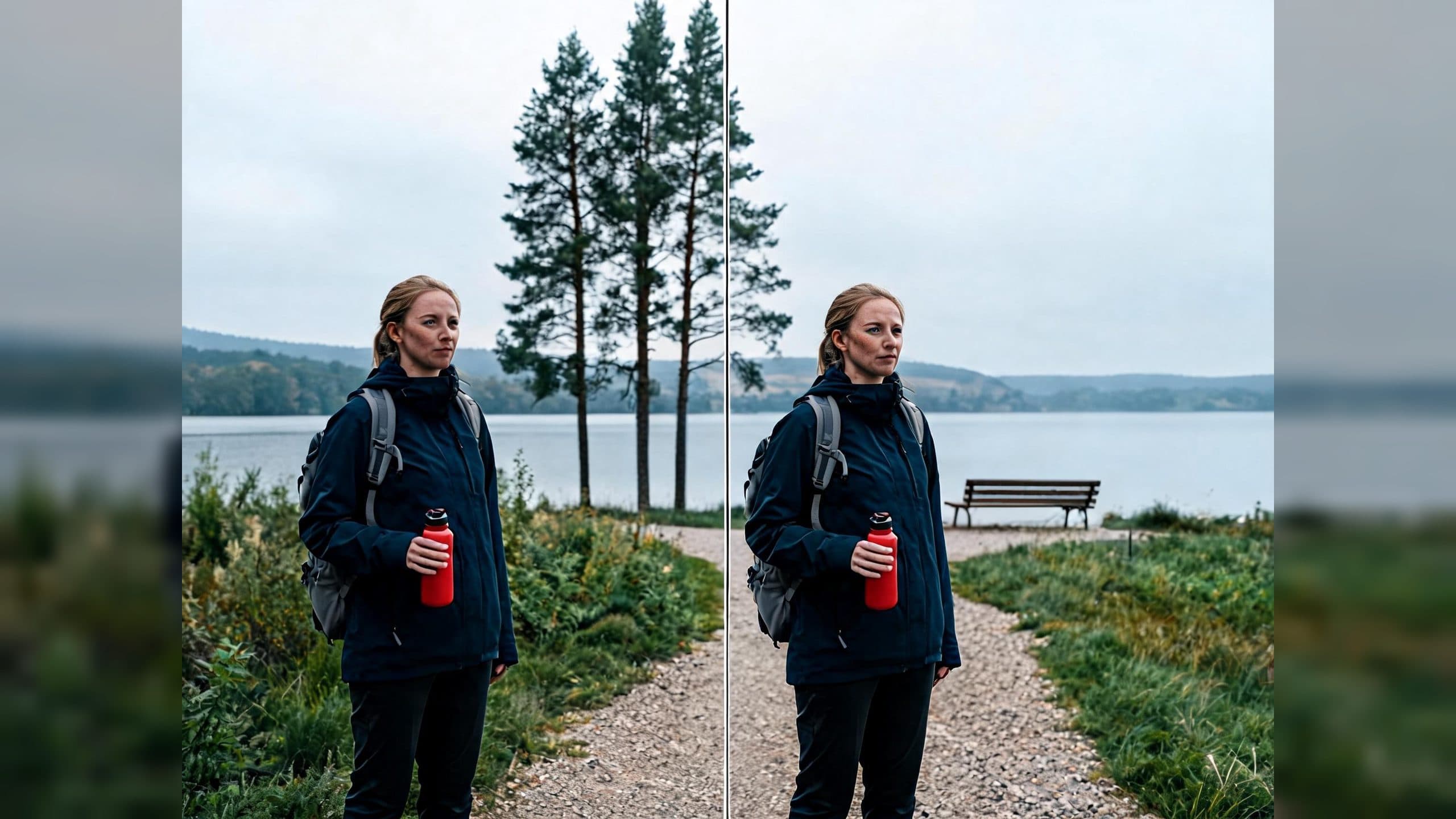
Upload an underexposed or hazy outdoor photo to create a clearer, more balanced image while keeping the person, composition, and landscape relationships recognizable. A structured AI outdoor photo editing prompt separates what must remain fixed from the global and local adjustments that improve the photograph.
Start with the visual anchors
Before describing better light or color, list the elements that define the original photograph. For a portrait, these anchors can include the person's identity, face, clothing, pose, gaze, scale, and position in the frame. For the setting, record the camera viewpoint, horizon, path direction, trees, buildings, shoreline, and foreground-to-background relationships.
These details give the edit a concrete map. A request such as “make this a beautiful sunny day” leaves the entire environment open to interpretation. A preservation section narrows the assignment to photographic refinement within the existing scene.
Separate global and local corrections
Use a global section for changes that should affect the whole image: exposure, white balance, shadow detail, contrast, and atmospheric clarity. Keep each instruction restrained and observable. “Gently lift the foreground shadows” gives a more useful target than stacking broad quality words.
Use a local section for specific environmental layers. Name the existing sky, vegetation, water, snow, stone, or architecture and describe the intended adjustment. Soft cloud detail, natural green separation, and realistic lake reflections can improve readability without asking for a new location.
Finish with practical limits covering reframing, replacement objects, changed clothing, altered poses, beauty retouching, oversaturation, HDR halos, text, and logos.
What the comparison revealed
The test used a fictional lakeside portrait with a woman on the left, three pine trees near the center, a bench on the right, a curving gravel path, a lake, and low hills. The source image was cool, hazy, and slightly underexposed.
The broad edit kept the main subject and general layout, then introduced a vivid blue sky with large white clouds, stronger sunlight, brighter grass, and much higher overall contrast. The structured edit retained the gray sky, subject scale, tree group, bench, shoreline, horizon, and path geometry while making smaller changes to exposure, white balance, shadows, and vegetation separation.
For this single image, the structured version matched the goal of a restrained, same-scene refinement more closely. The broad version offers a useful reminder that words such as “better weather” and “beautiful” can invite a larger visual redesign.
A four-part prompt pattern
- Preserve: identify the person, pose, wardrobe, objects, framing, camera viewpoint, and spatial landmarks that must stay fixed.
- Global: adjust exposure, white balance, shadows, contrast, and clarity across the photograph.
- Local: refine named areas such as the existing sky, vegetation, water, or architecture.
- Limits: prevent likely changes to composition, identity, objects, texture, and photographic realism.
Where this method helps
A travel creator can improve a gray lakeside portrait while retaining the exact trail, shoreline, and mountain arrangement that identifies the location. A real estate photographer can balance an overcast exterior while keeping the building footprint, windows, landscaping, and camera position stable. A family photographer can lift shadows in a park portrait while protecting faces, clothing, poses, and the original background layout.
The best source image has readable subjects and landmarks even when its light or color needs work. Clear visual anchors make the preservation section specific, and distinct environmental layers make the local adjustments easier to describe.
Frequently asked questions
What should go in the preserve section?
Include identity, pose, clothing, subject position, crop, viewpoint, horizon, major objects, and the spatial relationships that define the scene.
How are global and local edits different?
Global edits affect the photograph as a whole, while local edits target named areas such as the sky, plants, water, or architecture.
How strong should the light and color changes be?
Use observable terms such as gently lifted shadows, neutral white balance, restrained saturation, and natural contrast to define the intended finish.
Which outdoor photos are good candidates?
Choose images with a clear subject and readable composition that would benefit from exposure, haze, white-balance, or environmental color refinement.
Keep exploring
More in AI Video Techniques

Motivated Cut AI Video Continuity: Change the Shot for a Reason
Learn how a visible action trigger, clear shot-size change, and locked screen direction create more intentional same-scene AI video edits.

Deep Depth of Field AI Video: Keep Every Story Layer Readable
Learn how deep depth of field AI video prompts keep foreground tools, central action, and distant location cues readable in one layered shot.

Medium Depth of Field AI Video: Balance Subject and Setting
Learn how medium depth of field AI video prompts keep hands and active objects readable while preserving recognizable environmental context.

AI Video Character Reference Framing: Match Portraits to Landscape Shots
Prepare vertical character portraits for landscape AI video by matching aspect ratio, body scale, headroom, floor space, and movement room before generation.