How to Write AI Video Sound Prompts: Dialogue, Music, and Ambience Tested
Learn how to write AI video sound prompts with dialogue priority, ambience, action sounds, music timing, and a Seedance 2.0 Fast A/B test.
10 min read
Learning how to write AI video sound prompts starts with treating audio as a hierarchy instead of a list. Choose one core sound, then give dialogue, ambience, action sounds, and music a relative level, time range, spatial position, and connection to the picture.
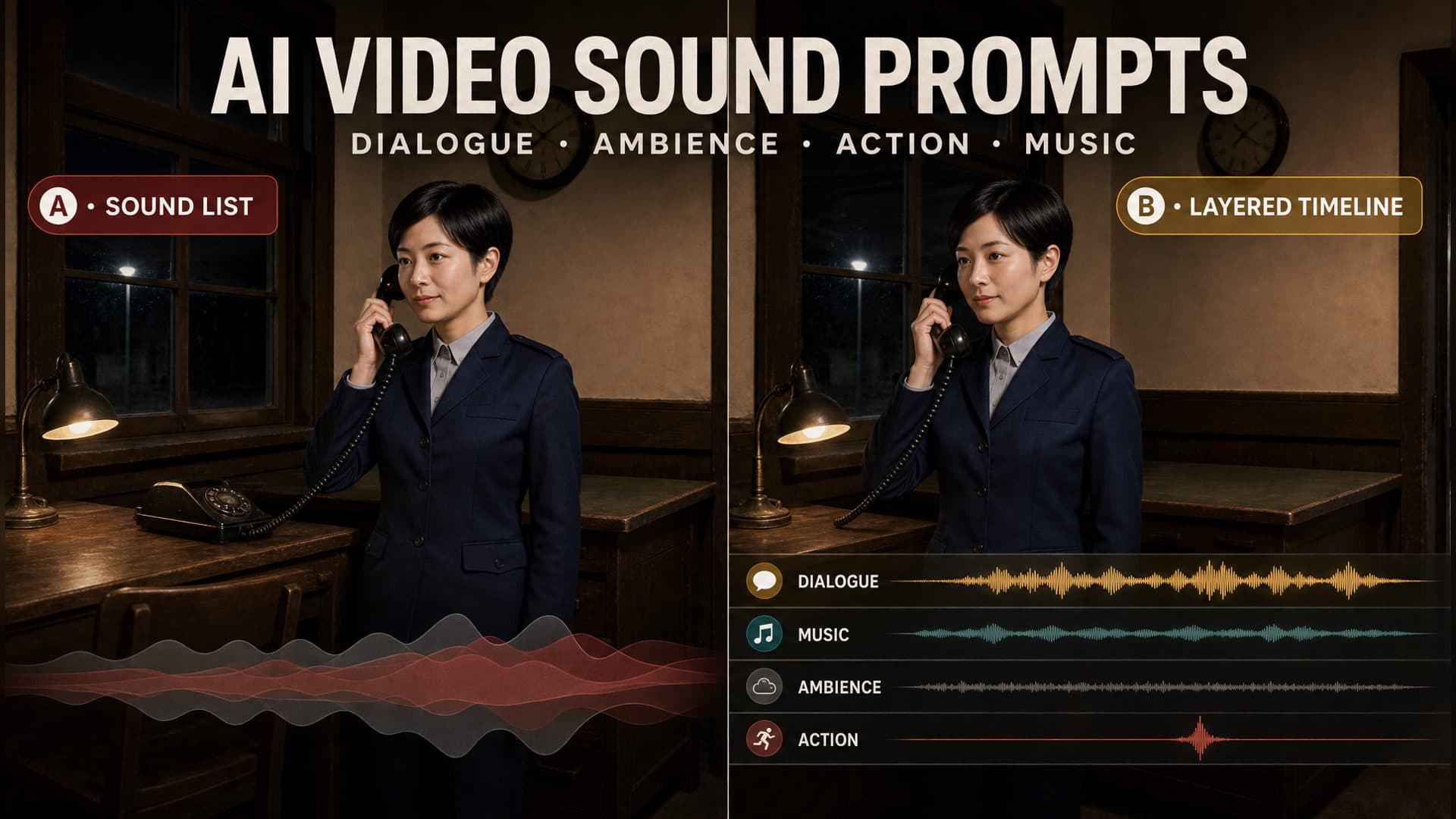
We tested this method in Seedance 2.0 Fast with the same character reference, environment reference, duration, and basic story. Version A requested clear dialogue, nighttime ambience, and sad music. Version B assigned priorities, vocal performance, time ranges, spatial positions, a synchronized telephone contact sound, and a controlled music entrance.
The 30-second answer: Put the story’s essential sound in the foreground. Place music beneath it, keep ambience at the bottom, and tie every action effect to a visible contact. State when each layer enters, where it comes from, how it behaves during dialogue, and what a reviewer should hear at the key moment.
What the A/B Test Showed
Both versions generated an eight-second scene in which a station attendant answers a telephone call and returns the receiver.
Version A named dialogue, ambience, and sad music. The model chose the delivery, timing, spatial placement, and mix balance.
Version B used this hierarchy:
Dialogue → music and action sound → ambience
Its foreground vocal section appeared most clearly from roughly 2 to 3.75 seconds. The final telephone contact created a strong transient around 7.25 to 7.5 seconds, aligned with the visible receiver movement. The planned action interval was 5 to 6 seconds, so the picture and sound moved together later in the clip.
Version B measured about -34.6 dBFS RMS with a peak near -11.5 dBFS. Version A measured about -36.6 dBFS RMS with a peak near -14.3 dBFS. The structured version carried more average energy and a stronger final transient.
The requested low-string layer in Version B stayed very subtle through much of the planned interval. That observation is useful because the layered prompt supplies clear review fields: presence, priority, timing, synchronization, and space.
The two outputs used unfixed seeds, so this sample serves as a practical first observation. Repeating the structure with fixed seeds and several generations will provide a stronger comparison.
Why a Sound List Leaves Important Decisions Open
Consider this instruction:
Generate clear dialogue, nighttime ambience, and sad background music.
It names three sound categories. The model still chooses:
Which layer stays in front
When the dialogue begins and ends
How the character delivers the line
Where the ambience comes from
When the music enters
How the music behaves during speech
Which visible action receives a synchronized effect
How the entire mix fits the room
A structured sound prompt answers those questions with relationships and timing.
The Six Parts of an AI Video Sound Prompt
1. Choose one core sound
Most narrative shots have one audio event that carries the story. It may be dialogue, a footstep, a door latch, a warning tone, a weapon mechanism, or the impact of an object.
Keep the core dialogue in the foreground throughout the spoken line.
Music and ambience leave clear space around the voice.
Once the core sound is selected, every supporting layer has a defined position in the hierarchy.
2. Write dialogue as a performance inside a room
A useful dialogue instruction includes the speaker, exact line, emotional delivery, pace, pause, vocal texture, and acoustic space.
The station attendant says, “The last train has already left.”
Her delivery is restrained and tired, with light breathiness and a slow pace.
She pauses briefly after “already.”
Use the short natural reverb of a small wood-paneled railway office.
Keep lip movement synchronized with the spoken line.
The text defines what she says. Performance details define how she says it. Reverb places the voice in the room.
3. Use ambience to establish space
“Night ambience” covers many possible sounds. Name the source, distance, direction, and relative level.
Distant wind and an occasional faint rail sound come from outside,
behind and to the right of the character.
Keep them in the quietest layer and preserve clear dialogue.
Ambience only needs enough presence to extend the world beyond the frame.
4. Bind an action sound to visible contact
An action-sound instruction should contain the movement, material, contact moment, and time range.
From 5 to 6 seconds, the character lowers the receiver.
At the instant it touches the telephone, add one light plastic contact sound.
Synchronize the contact sound with the visible impact.
Placing the motion and sound in the same time block creates one audiovisual event. Review can then score schedule accuracy and synchronization separately.
5. Give music an entrance and a yielding rule
Mood labels describe emotion while leaving the mix behavior open. Add an entrance, level relationship, and response to dialogue.
After 2 seconds, very quiet low strings fade in.
Keep them below the dialogue and above the ambient noise floor.
Hold the level back during speech and keep the ending controlled.
The music now has a start, a place in the hierarchy, and a rule for supporting the voice.
6. Prefer relative priority over isolated numbers
Decibel targets can supplement a prompt, while relative relationships provide the main creative direction.
Dialogue is the clearest layer.
Music stays clearly below the dialogue.
Ambience remains at the bottom.
The action sound is distinct at contact and remains comfortable.
These relationships are easy to hear and easy to score.
A Reusable AI Video Sound Prompt
[DURATION AND VISIBLE ACTION]
Create one continuous [duration] shot.
[Character] performs [action sequence] inside [environment].

[CORE DIALOGUE]
From [time range], [character] says, “[exact line].”
Use a [delivery], [pace], and [specific pause].
Add [breathiness, tremor, rasp, or another vocal detail].
Keep the voice in the foreground with the natural
[short, open, wooden, or other] reverb of [environment].
Keep lip movement synchronized with the line.

[AMBIENCE]
From [time range], include [wind, rain, people, machinery, or another source].
Place it at [direction and distance] in the quietest layer.
Preserve clear space around the core sound.

[ACTION SOUND]
From [time range], the character performs [visible action].
At [contact or movement moment], add [material and level].
Synchronize it with the picture.

[MUSIC]
After [time], [instrument or music type] enters with [fade or other entrance].
The emotion is [emotion].
Keep it below the dialogue and above the ambient noise floor.
Hold it back during [speech or action] and keep the ending controlled.

[OVERALL PRIORITY]
Maintain this order throughout:
[core sound] > [music or action sound] > [ambience].
For a first test, begin with three layers:
Dialogue
→ one ambient source
→ one action sound tied to visible contact
Add music and more spatial detail after the basic hierarchy remains audible across several generations.
How to Review Generated Sound
Score five fields after every generation.
Presence
Listen for each required layer. Mark the dialogue, ambience, action sound, and music as clearly present, subtle, or dominant.
Priority
Check which sound attracts attention first. The core sound should remain intelligible while the supporting layers keep their assigned positions.
Timing
Record the actual entrance and ending of each layer. Compare those moments with the requested intervals.
Synchronization
Watch the picture and listen for the effect together. A telephone contact, footstep, door latch, or object impact should land on the visible event.
Space
Evaluate direction, distance, and reverb. A voice inside a small wooden office should feel closer and shorter than a voice in a large station hall. Outdoor wind can sit farther away and toward a defined side of the frame.
Timing and synchronization answer different questions. A sound may align precisely with a visible movement while the shared event occurs later than planned.
How to Run a Useful Sound A/B Test
Use the same character reference, environment reference, model, duration, aspect ratio, base action, and audio setting on both sides. Fix the seed when the workflow supports it.
In the control version, name the dialogue, ambience, and music in one concise instruction.
In the structured version, add:
One core sound
Overall priority order
Dialogue performance
Time ranges
Ambience source, distance, and direction
One effect tied to a visible movement
Music entrance and yielding rule
Room acoustics
Generate several samples. Watch and listen to the complete clip first, then inspect the spoken interval, the quiet interval, and the action transient. Record presence, masking, schedule accuracy, picture sync, and spatial fit as separate fields.
Waveform measurements can locate louder sections, quieter passages, and transients. Listening review identifies the actual source and creative function of each sound.
Common Sound-Prompt Mistakes
Listing sounds without relationships
Someone speaks. There is wind. Sad music plays.
Define the mix order:
Dialogue stays in front.
Sad strings remain below the voice.
Distant wind stays at the bottom and preserves speech clarity.
Giving every layer foreground priority
Dialogue, wind, rail noise, contact effects, and music serve different functions. Choose the core sound and place each supporting source at a deliberate level.
Timing the effect without timing the action
Put the movement and effect inside the same block:
From 5 to 6 seconds, the character lowers the receiver.
Add a light plastic contact at the instant it reaches the telephone.
Treating overall loudness as sound design
Average level describes energy. A strong hierarchy also requires speech clarity, supportive music, readable ambience, accurate timing, picture synchronization, and appropriate space.
Skipping the complete-video review
Listen once for the story, then review each layer. A strong opening can hide a weak ending, and a clear dialogue section can draw attention away from a late action sound.
Frequently Asked Questions
Do AI video sound prompts need exact decibel values?
Relative priority provides a practical starting point: dialogue in front, music below dialogue, and ambience at the bottom. Add decibel values when they clarify the intended relationship and support later measurement.
Why is background music very subtle after it appears in the prompt?
Several simultaneous sources can push a quiet layer toward the floor. Give the music a specific entrance, keep the ambient design simple, and state its level relative to dialogue and ambience. Review the full requested interval after generation.
Why can an action sound feel synchronized yet arrive late?
Synchronization measures whether sound and picture meet at the same moment. Timing measures whether that shared moment occurs in the requested interval. Score both fields so the next prompt revision targets the correct issue.
How can I tell whether dialogue, music, and ambience form a hierarchy?
The dialogue stays understandable, the music carries emotion while supporting the voice, and ambience establishes space from the lowest layer. Each source should have a distinct story function and a clear relative position.
Click the template card on this page, enter the experience page, and try the AI video sound prompt with your own character and scene.
How to Write AI Video Sound Prompts: Dialogue, Music, and Ambience Tested | ArtArch