

ArtArch Newsroom
AI Video TechniquesAI Video Shot Size Prompts: Use Framing to Show Emotion
Use AI video shot size prompts to give a calm character more space, frame an anxious character tightly, and build pressure with a gradual push-in.
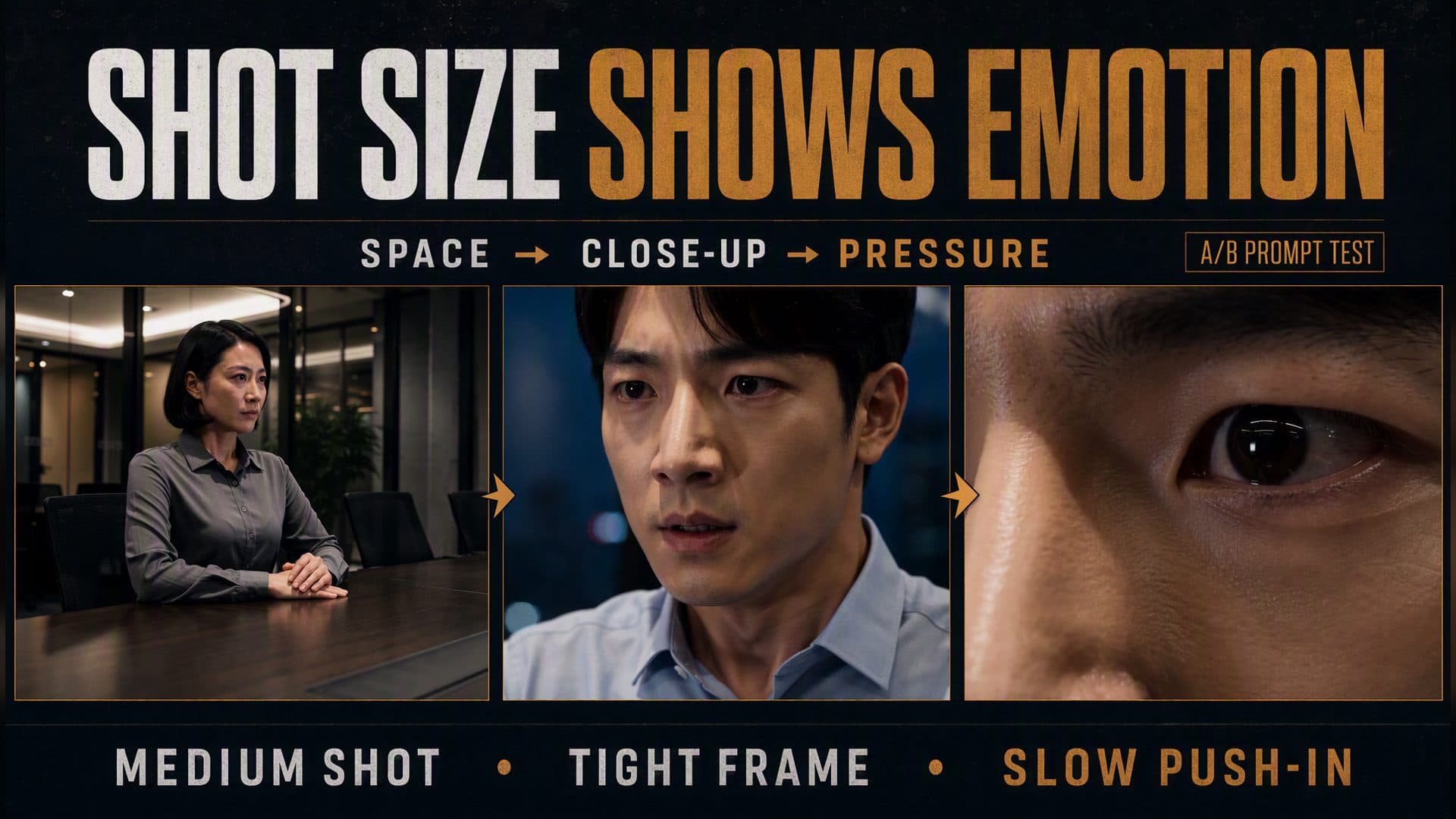
Provide two character references and an empty meeting-room reference to create an eight-second dialogue reaction built around unequal framing. These AI video shot size prompts give the calm supervisor a loose medium shot with visible table and room space, then place the anxious employee in a tight close-up that gradually advances toward his eyes. The change in frame pressure turns a psychological difference into a visible camera decision.
AVT-010 compares conventional alternating coverage with an asymmetric shot-size plan in the same nighttime office. Both versions feature a short-haired female supervisor in a dark gray shirt and a young male employee in a light blue shirt. The control uses familiar medium-close views. The technique version gives the supervisor room to breathe and progressively reduces the employee’s visual space.
The directing principle is straightforward: assign shot size according to the character’s current psychological position, then change the frame only when the pressure or information changes.
What the A/B framing test showed
Both outputs are 1280 × 720, 16:9, and approximately 8.08 seconds long. Each file includes a stereo audio track. The visual review focuses on character scale, visible environment, headroom, cut timing, facial emphasis, and the direction of the push-in.
| Observation | A: conventional coverage | B: asymmetric psychological framing |
|---|---|---|
| Supervisor | Conventional close view | Loose medium shot with table and room context |
| Employee | Conventional medium-close view | Tight face close-up |
| Environment | Both characters retain recognizable office context | Supervisor keeps context; employee loses most background space |
| Cut pattern | Supervisor → employee → supervisor | Supervisor → employee, then continuous pressure on employee |
| Detected cuts | About 2.88 and 6.21 seconds | About 1.04 seconds |
| Final frame | Returns to the supervisor | Ends in an extreme close-up around the employee’s eye |
The conventional sample begins on the supervisor in a regular close view. At about 2.88 seconds it cuts to the employee in a medium-close composition that retains his torso, chair, and meeting room. At about 6.21 seconds it returns to the supervisor. Their performances differ, yet the framing language remains broadly balanced.
The technique sample opens wider. The supervisor sits behind the long table with several chairs, glass partitions, ceiling light, and room depth visible around her. At about 1.04 seconds, the edit cuts to the employee’s face. The camera stays with him for the rest of the clip and gradually advances from a close-up to an extreme detail of his eyes by approximately 7.8 seconds.
The generated timing compresses the planned structure. The supervisor’s section ends well before the written three-second mark, and the employee’s planned close-up and final push-in merge into one continuous tightening movement. The central visual relationship still reads clearly: one character receives stable environmental space, while the other experiences increasing frame pressure.
This is an E1 observation from one A/B pair with open video seeds. It establishes a concrete framing pattern for repeat tests across different conversations, performers, room layouts, and emotional progressions.
Why shot size changes the emotional reading
Shot size determines how much of the character and surrounding space the viewer can process at once. A medium shot keeps posture, hands, furniture, and room relationships available. A close-up gives the face more authority. An extreme close-up removes most spatial information and concentrates attention on one feature or response.
The frame therefore communicates two things at the same time:
- what information matters now;
- how much visual space the character appears to control.
In the AVT-010 meeting room, the supervisor’s loose medium shot includes her upper body, both hands, the tabletop, several chairs, and the glass-walled office. Her posture reads as stable because the composition gives her a firm relationship to the room.
The employee’s close-up removes the table and most of the architecture. His face fills the frame, and the gradual push-in reduces headroom until the eye becomes the final image. The composition directs attention toward blinking, breathing, jaw tension, and gaze.
Shot size works best as part of a complete performance choice. Posture, expression, eye direction, movement speed, light, and composition all support the same emotional interpretation.
Use asymmetric coverage to show a power difference
Dialogue coverage often begins with matching shot sizes because visual balance supports clear conversation. A power imbalance benefits from deliberate asymmetry.
Give the stable character environmental control
Frame the more composed person in a medium or loose medium shot. Include a meaningful set anchor such as a desk, table edge, doorway, window, or chair line. Let the character occupy a clear position without crowding the frame.
For the supervisor, the prompt specifies:
Use a loose medium shot.
Keep the upper body, hands, table surface, chairs, and meeting-room depth visible.
Maintain relaxed shoulders, steady breathing, and a stable seated posture.
The combination of wider framing and still posture creates a visual sense of control.
Give the pressured character less space
Frame the anxious person more tightly. Reduce background information and make small facial changes easier to read. Keep the performance controlled so several competing actions do not distract from the close-up.
For the employee, the prompt uses:
Cut to a tight facial close-up.
Reduce visible background and tighten the space around the forehead and chin.
Emphasize blinking, shallow breathing, gaze, and slight jaw tension.
The close-up makes internal strain the primary information.
Let the frame tighten when pressure rises
Move closer only after the scene provides a reason. A difficult question, revealed document, silence, contradiction, or decision can motivate the push-in.
In the generated sample, the camera remains on the employee and continues advancing. The sequence moves through three readable stages:
full face close-up → tighter face detail → eye-level extreme close-up
The final image converts psychological escalation into a change in visible scale.
Design each shot around one emotional job
Loose medium shot: stability and context
Use a loose medium shot when posture, hand placement, and the character’s relationship to the setting matter. This scale supports a composed manager, confident negotiator, attentive detective, or person controlling the pace of a conversation.
Name the body information and set anchors that should remain visible. “Medium shot” alone leaves too many framing decisions open.
Standard close shot: exchange and evaluation
Use a conventional close or medium-close view when the audience needs expression and some body context. This scale suits listening, answering, testing another person’s reaction, and maintaining neutral dialogue rhythm.
It also makes a useful baseline. Later tightening becomes more meaningful when the sequence begins from a recognizable conversational scale.
Tight close-up: pressure and restricted attention
Use a tight close-up when the face carries the decisive information. Reduce background detail, narrow headroom, and choose one or two performance signals such as blink rate, lip tension, eye movement, or breath.
The character should still have a clear gaze target. A close-up gains narrative meaning when the viewer understands who or what creates the pressure.
Extreme close-up: peak information
Reserve the most compressed frame for a discovery, decision, loss of control, or critical reaction. Select one feature—the eyes, mouth, hand, or object detail—and build toward it.
The AVT-010 sample finishes on the employee’s eye after a continuous push. Because the earlier frame established his full face, the extreme close-up reads as escalation instead of a disconnected detail.
A four-layer prompt method
Layer 1: define the psychological relationship
Write the contrast before naming lenses or camera motion:
Character A remains composed and controls the pace.
Character B feels observed and becomes increasingly anxious.
This gives every later choice a dramatic purpose.
Layer 2: assign a base shot size to each character
Translate the relationship into composition:
Character A: loose medium shot with table, hands, and room depth.
Character B: tight face close-up with reduced background and narrow headroom.
Different characters can receive different visual space within the same conversation.
Layer 3: connect framing to performance
Give each person a small, compatible behavior set:
Character A: relaxed shoulders, steady gaze, still hands, even breathing.
Character B: quick blink, shallow breath, slight jaw tension, controlled movement.
The body and frame should describe the same emotional state.
Layer 4: motivate the change
State when and why the camera moves closer:
After the supervisor pauses, remain on the employee.
Begin a very slow, small push-in as his pressure rises.
End on his eyes and settle without a sudden jump in scale.
The trigger connects camera movement to the dramatic beat.
An eight-second psychological framing template
Create an eight-second dialogue reaction using two character references and one location reference.
Keep both identities, wardrobes, screen direction, and room layout consistent.

0–3 seconds — composed character:
Show Character A in a loose medium shot.
Include [hands, table, chair, doorway, or room depth] to create generous environmental space.
Use [relaxed shoulders, steady gaze, even breathing, or still hands] to communicate control.
Keep the camera stable.

3–6 seconds — pressured character:
Cut to Character B in a tight close-up.
Reduce background information and tighten the space around the face.
Emphasize [blink, breath, jaw tension, lip movement, or eye direction].
Keep movement restrained and maintain the established gaze direction.

6–8 seconds — escalation:
Stay with Character B.
Begin a very slow, small push-in motivated by [question, silence, reveal, or decision].
Progress from [full face] toward [eyes or another decisive detail].
End in a settled frame that communicates increased pressure.
Use the timestamps as a directing plan, then measure the actual generated cuts and final scale. The emotional structure matters more than exact mechanical timing.
Review the generated framing
Compare character scale
Select one representative frame for each person. Compare how much of the body appears, how large the face is, and how much room remains around the head and shoulders.
Compare environmental information
List visible set anchors. The stable character may retain table, chairs, walls, and depth. The pressured character may retain only a blurred background or a single light cue.
Track the push-in
Choose early, middle, and final frames from the tightening shot. Confirm that the face occupies progressively more of the image and that the final detail follows a readable path.
Match performance to composition
Check whether posture, gaze, blink, breath, mouth, and jaw support the shot-size choice. Use a small number of clear signals in tight framing.
Check the conversation relationship
Preserve eye direction and character identity across the cut. The wide and tight frames should feel like two sides of one exchange.
For repeat testing, keep the references and room fixed while varying the emotional trigger, push-in speed, initial headroom, and final detail.
Scenes that benefit from shot-size contrast
Performance review
A manager sits comfortably behind a conference table while an employee answers a difficult question. The manager keeps room context; the employee receives a tightening close-up as the answer becomes harder to maintain.
Interrogation or investigation
An investigator remains stable in a medium shot with files and room geometry visible. The subject receives less background space as a contradiction emerges, ending on the eyes or a hand gripping the chair.
Negotiation
One party controls the offer and remains connected to the table, documents, and surrounding team. The other party moves from conventional coverage into a close-up as the terms become personally costly.
Quiet relationship conflict
Two people speak softly across a room. One remains open and physically grounded. The other becomes increasingly isolated in the frame as silence replaces dialogue.
Frequently asked questions
Which shot size best shows anxiety in an AI video?
A tight face close-up can emphasize gaze, blinking, breathing, and jaw tension. A gradual push toward the eyes can add escalation when the scene contains a clear trigger.
How should I frame the calmer character?
Use a loose medium shot that includes posture, hands, and meaningful environment. Stable camera placement and generous surrounding space reinforce the character’s control of the scene.
Should both sides of a dialogue use matching shot sizes?
Matching coverage supports balance and clarity. Asymmetric coverage makes a difference in power, confidence, or pressure visible when each shot size follows the character’s psychological state.
How fast should an emotional push-in move?
Use a slow, small movement that begins after a meaningful beat and ends on a specific facial detail. Review early, middle, and final frames to confirm a gradual increase in scale.
Click the template card to enter the experience page and try these AI video shot size prompts with your own characters, location, psychological contrast, and motivated push-in.
Keep exploring
More in AI Video Techniques
How to Make an AI Motion Transfer Video from a Dance Reference
Learn how beginners can use a character image, dance reference, and tracked depth motion to make an AI motion transfer video with ArtArch.
Depth-Based Action Reenactment for Beginners
Learn how depth-based action reenactment turns a dance reference into a motion guide for a new character with ArtArch.
AI Dance Video Reenactment from a Reference Video for Beginners
Learn how to use a character image, dance reference video, and depth motion guide to create an AI dance reenactment with ArtArch.
Build an AI Video Workflow with an Agent and ArtArch CLI
Build an AI agent video workflow with ArtArch CLI: inspect a canvas, connect references, run a flow, wait on the same run, and download artifacts.