

ArtArch Newsroom
AI Video TechniquesAI Video Insert Shot Prompts: Build Suspense with Props, Environment, and Reactions
Use AI video insert shot prompts to reveal props, establish space, show environmental change, connect reactions, and guide character action.
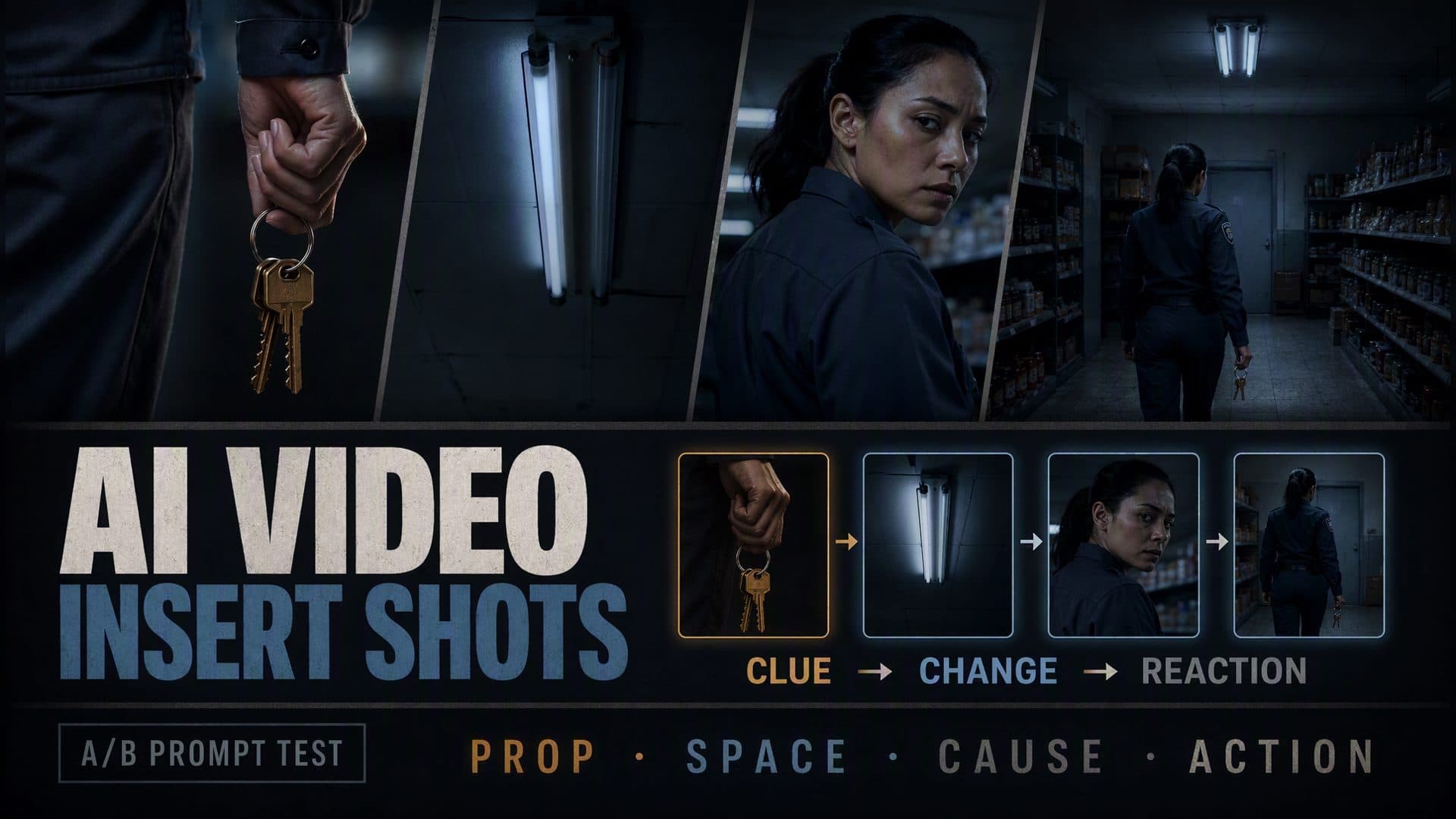
Provide a character reference and an empty location reference to create an eight-second suspense scene built from a prop close-up, a wide spatial reveal, an environmental change, a reaction, and a final decision. These AI video insert shot prompts give every cut a storytelling job, so a ring of keys, a failing ceiling light, and a guarded look become one connected event.
AVT-008 compares a continuous performance prompt with a structured insert-shot plan in the same closed grocery store at night. The continuous version keeps the camera with the security guard as she notices something behind her. The structured version begins on the keys in her right hand, reveals the store and rear door, cuts to a fluorescent fixture changing state, returns to her reaction, and finishes with her moving toward the door.
The practical principle is simple: define the new information in each shot before describing its composition.
What the A/B test showed
Both samples use the same short-haired female security guard in a dark gray uniform and the same grocery store with a checkout counter, two aisles, ceiling lights, and a rear storage door.
Each video is 1280 × 720, 16:9, and about 8.06 seconds long. Both files contain an audio track. The comparison focuses on visible information order, prop continuity, environmental change, reaction direction, and the action that follows.
| Observation | Continuous performance prompt | Structured insert-shot prompt |
|---|---|---|
| Opening | Medium view of the guard in the aisle | Close-up of keys in her right hand |
| Spatial reveal | Store remains around the performer | Wide shot maps the guard and rear door |
| Environmental event | Suspense stays general | Fluorescent fixture changes from fully lit to partly dark |
| Reaction | Camera pushes closer during her turn | Reaction follows the environmental insert |
| Final beat | Shoulder view points toward the door | Wider view shows her shifting toward the door |
| Information structure | Performance carries the scene | Prop, space, event, reaction, and action form a chain |
The continuous sample works as a compact performance. The guard appears in a medium shot, scans the dark aisle, turns quickly, and finishes with the rear door visible beyond her shoulder. The camera moves closer throughout the moment, so her eyes and face carry the tension.
The structured sample creates more distinct information beats. It begins with a close-up of three keys hanging from a metal ring in the guard’s right hand. A wide view then places her left of center and the rear door in the deep background. The scene cuts to a ceiling fixture. One frame shows both tubes lit; a later frame shows one side dark. The next close-up captures her gaze turning toward the disturbance. The final wide view returns to the aisle as she shifts toward the rear door, with the keys still visible in her right hand.
The generated timing follows the planned order while compressing the lighting insert. The reaction begins earlier than the written five-second mark. The key frames verify a change in the fixture’s visible lighting state; they support the environmental-change beat while keeping the precise flicker count outside the claim.
This is an E1 observation from one scene and one generation per prompt, with the video seed left open. It offers a practical structure for repeat testing across props, locations, genres, and timing plans.
Why an insert shot needs a narrative function
An insert shot briefly replaces the main view with a closer object, environmental detail, secondary action, or reaction. Its value comes from the information it adds.
A close-up of keys can establish access, responsibility, or a future action. A shot of a ceiling light changing state can turn general darkness into a specific electrical problem. A reaction shot can confirm that the character noticed the change. A return to the wider scene can show the decision produced by that information.
The AVT-008 sequence can be summarized as five statements:
- She carries keys.
- She stands inside a closed store with a rear door ahead.
- The lighting changes.
- She notices the change.
- She moves toward the door.
Every shot advances the viewer’s understanding. The sequence feels larger than eight seconds because it contains a clue, a location, an event, a response, and a choice.
Read the five shots as one information chain
Shot 1: use a prop close-up to open a question
The opening frame isolates the guard’s right hand and the key ring. Her face and the complete store remain outside the composition. The viewer receives a concrete clue before receiving context.
This order creates several useful questions. Who holds the keys? What can they open? Why are they important at this moment?
The prompt assigns one visible action:
Show a close-up of an ordinary key ring in the guard’s right hand.
Let the keys move slightly.
Keep the complete location outside the frame.
The object is simple enough to read quickly. Its shape, metal ring, and relationship to the hand remain clear.
Shot 2: reveal the spatial answer
The next shot opens to a wider grocery-store view. The guard stands left of center near the checkout area. Shelves create a corridor toward the rear storage door.
The wide view connects the earlier clue to a possible destination. The keys now belong to a security guard inside a closed store, and the door becomes a visual target.
This is the value of placing the close-up first. The wide shot answers the question created by the insert while adding a new one: what is happening near the door?
Shot 3: let the environment change
The structured scene cuts away from the guard to a ceiling fluorescent fixture. At the beginning of the insert, both tubes appear bright. A later key frame shows one side dark.
The fixture becomes an active story element. The environment has changed state, which gives the guard a specific event to notice.
An effective environmental insert describes both states:
Show the ceiling fixture with both tubes lit.
Change the fixture so one tube goes dark.
Use the lighting change as the new story information.
Initial state and changed state make the event reviewable in key frames.
Shot 4: connect the event to the character
The next close-up returns to the guard. Her eyes move toward the rear area, then her head turns in the same direction.
This reaction connects the ceiling-light insert to the person. The viewer understands that the environmental change has entered her awareness.
The reaction has its own internal order:
She stops her current movement.
Her gaze shifts toward the rear of the store.
Her head follows the gaze.
Breaking the response into eye movement and head movement gives the performance a readable progression.
Shot 5: return to action
The final shot widens again. The guard remains in the left half of the store and shifts toward the rear-door direction. The key ring stays in her right hand.
This return shot closes the information loop. The keys introduced at the beginning remain available for the action. The door established in the wide view remains the target. The lighting event has produced a response, and the response has produced a decision.
Four jobs an insert shot can perform
Reveal a clue
Use a close-up when a small object changes the meaning of the scene. A key, phone notification, blood mark, broken seal, missing screw, or handwritten note can carry information that disappears in a wider composition.
Match the shot duration to the reading task. A familiar object reads quickly. Dense text, a mechanical state, or a multi-part clue needs a longer hold.
Delay context
Place the detail before the wide shot when the scene benefits from a question. The first view shows a hand, object, or texture. The next view reveals the person, location, and relationship.
This order works well for suspense, discovery, product reveals, and entrances. The close-up earns its place by changing when the viewer learns the full context.
Establish cause and effect
Place an event insert before a reaction:
Light changes state → character notices → character turns
The edit creates a readable causal relationship. The event and reaction should share a direction, sound source, visible target, or timing cue.
Bridge into the next action
Return to a medium or wide shot after the reaction. Show how the new information changes behavior: the character walks to a door, hides an object, follows a sound, calls another person, or abandons the original task.
The return shot turns information into a decision.
A five-part prompt method
1. Write the new information first
Start with a sentence that describes what the viewer learns:
New information: the guard carries the storage-room keys.
Then translate it into a shot:
Close-up of the keys hanging from her right hand.
This order keeps visual style subordinate to story function.
2. Choose when to reveal the location
For delayed context:
Keep the full store outside the opening close-up.
Reveal the aisle, checkout counter, and rear door in the next wide shot.
For immediate orientation, reverse the order: establish first, then cut closer to the clue. The right order depends on whether clarity or suspense leads the beat.
3. Describe an observable state change
Environmental language becomes actionable when it includes two visible states:
The fixture begins with both tubes lit.
One tube goes dark.
The surrounding aisle becomes dimmer.
State changes give the insert a beginning and an end.
4. Give the reaction a direction
State where the information originates and how the performer connects to it:
Her eyes move toward the rear-right area.
Her head turns in the same direction.
Her body remains controlled.
Direction helps the reaction belong to the previous shot.
5. Preserve continuity and close the loop
List the details that carry across the cuts:
Keep the same keys in her right hand.
Keep the guard’s uniform and identity stable.
Keep the checkout counter, aisles, and rear door in fixed positions.
End with her moving toward the door.
Prop hand, object appearance, set layout, and character position deserve explicit continuity checks.
An eight-second insert-shot prompt template
Create an eight-second [suspense, investigation, or dialogue] scene.
Give every insert shot one new piece of information.
Connect the shots through a prop, environmental change, gaze, sound, or action.

0–1.5 seconds — local clue:
Use a close-up of [prop or body detail] held by [character].
Show [one readable state or small movement].
Keep [character identity or complete location] outside the frame for the moment.

1.5–3.5 seconds — spatial reveal:
Cut to a wider shot.
Place the character at [visible set anchor A].
Place [door, person, or target] at [visible set anchor B].
Show how the opening clue relates to the location.

3.5–5 seconds — environmental or secondary insert:
Show [environmental object or secondary character].
Change it from [initial state] to [new state].
The new information is [danger, interruption, clue, or obstacle].

5–6.5 seconds — reaction:
Cut to the main character.
The character first [stops, shifts gaze, or changes breathing].
The character then [turns head, changes expression, or rotates the body].
Aim the reaction toward the source established in the previous shot.

6.5–8 seconds — action return:
Return to a [medium or wide] shot.
The character carries the same [prop] and moves toward [target].
Show the action produced by the new information.

Keep identity, wardrobe, prop appearance, holding hand, and location layout continuous.
Give each shot one primary information task and enough time for the viewer to read it.
The timestamps act as a planning grid. The generated edit can compress or expand individual beats, so review both the final order and the approximate duration of each information unit.
Three scenes that benefit from insert-shot planning
A mystery or investigation
A detective enters an office with a photo reference and a room reference. A close-up reveals a broken drawer lock. The wide shot shows the desk and open window. A curtain movement becomes the environmental insert. The detective’s gaze follows, then the return shot shows her approaching the window.
Each cut moves from clue to location to event to response.
A restrained dialogue
Two characters sit across a table. The conversation continues in medium coverage until one person tightens a hand around a folded letter. The letter insert changes the emotional meaning of the dialogue. A reaction shot shows the other person noticing, and the return shot captures a decision to leave or reveal the letter.
The prop carries subtext that facial coverage alone may leave vague.
A workplace incident
A technician holds a key card near a closed equipment room. The wide shot establishes the hallway and warning light. An insert shows the light changing color. The technician reacts, then moves toward the control panel.
The sequence gives product demos, training stories, and branded narrative clips a clear visual cause-and-effect structure.
How to review the generated scene
Review one representative frame from each information beat:
- The clue frame should make the object and holding hand clear.
- The wide frame should map the character, target, and main set anchors.
- The environmental frame should show a visible state or action.
- The reaction frame should point attention toward the established source.
- The return frame should show a decision and preserve the earlier prop.
Then watch the complete clip and ask:
- Does every cut add a new fact?
- Does the clue connect to the later action?
- Does the environment have a clear before-and-after state?
- Does the character react after the event?
- Does the gaze point toward the correct area?
- Does the final action answer the new information?
- Do the prop, holding hand, wardrobe, identity, and set layout stay continuous?
- Does each shot remain long enough to read?
Repeat the prompt across several random states to measure timing and continuity stability. A useful next test changes the prop complexity while preserving the same five-shot structure.
Frequently asked questions
What is an insert shot in an AI video?
An insert shot is a brief view of a prop, environmental detail, secondary action, or reaction that adds information to the main scene. Its placement changes what the viewer knows and when the viewer learns it.
Should the insert shot come before or after the wide shot?
Place the insert first when the detail should create a question and the wide shot should reveal context. Place the wide shot first when the viewer needs immediate orientation before examining a clue.
How long should an insert shot last?
Match the duration to the information. A familiar object or simple state can read in a short beat. Written text, complex machinery, and multi-part clues benefit from a longer hold.
How do I keep a prop consistent across insert shots?
Name the prop’s appearance, holding hand, position, and later use. Repeat those continuity details in the close-up, reaction, and return shot so the object remains connected to the same character and action.
Click the template card to enter the experience page and try these AI video insert shot prompts with your own prop, location, environmental change, reaction, and final action.
Keep exploring
More in AI Video Techniques
How to Make an AI Motion Transfer Video from a Dance Reference
Learn how beginners can use a character image, dance reference, and tracked depth motion to make an AI motion transfer video with ArtArch.
Depth-Based Action Reenactment for Beginners
Learn how depth-based action reenactment turns a dance reference into a motion guide for a new character with ArtArch.
AI Dance Video Reenactment from a Reference Video for Beginners
Learn how to use a character image, dance reference video, and depth motion guide to create an AI dance reenactment with ArtArch.
Build an AI Video Workflow with an Agent and ArtArch CLI
Build an AI agent video workflow with ArtArch CLI: inspect a canvas, connect references, run a flow, wait on the same run, and download artifacts.