

ArtArch Newsroom
AI Video TechniquesAI Video Character Consistency Across Shots: Clothing, Props, and State Tested
Learn how to improve AI video character consistency across shots with identity anchors, shot-state records, matched references, and three Seedance 2.0 Fast tests.
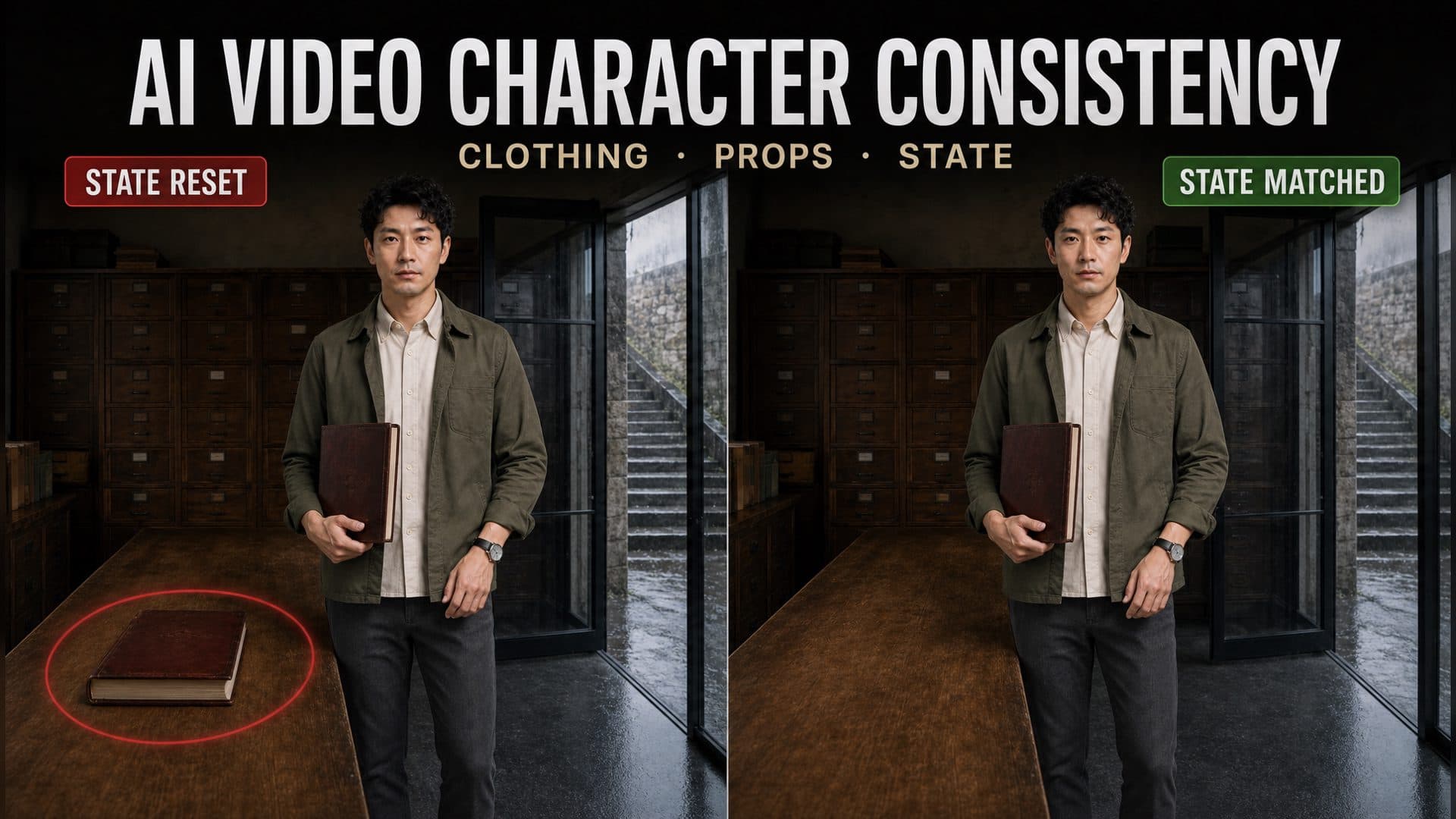
Provide a clean character sheet, a base environment reference, and a state-matched handoff image to create connected shots with stronger AI video character consistency. The character’s face and wardrobe form one continuity layer; prop ownership, position, weather exposure, injuries, and other story changes form a second layer that must pass from one shot to the next.
We tested this system in Seedance 2.0 Fast with three two-shot A/B comparisons. The first focused on clothing and accessories, the second on a handheld archive book, and the third on a controlled change from dry clothing to light rain exposure.
The 30-second answer: Keep permanent character anchors separate from shot-specific state. Record the start and end state of every shot, then give the next shot a reference that visually matches the previous ending. In this test, the character’s main clothing stayed stable, detailed instructions kept the archive book in the right hand, and an unchanged environment reference restored a second book on the table. The visual handoff carried more weight than an additional exclusion line.
What the Three Multi-Shot Tests Showed
All three tests used the same lean male journalist, short curly black hair, open olive cotton jacket, off-white shirt, dark gray pants, black shoes, and round left-wrist watch.
The clothing test produced stable large-scale attributes in both versions. The shared character sheet already supplied a strong identity and wardrobe baseline, so the more detailed version showed a similar visible result in this single sample.
The prop test revealed a different continuity problem. Version B kept the dark red archive book in the character’s right hand and on the right side of his body. The next shot also restored another book at the center of the table because the reused environment image still displayed that original table state.
The weather-state test separated identity from legal change. Version A moved the journalist from the archive room to the rainy steps. Version B held the dry state near the doorway in its first shot, then returned the character to the interior in its second shot. Both samples kept the hair and jacket visually close to dry.
These results support a practical production rule: text anchors organize what to inspect, while a state-matched reference carries the visible facts of the story into the next generation.
How the Experiment Was Structured
Each subtest included four clips:
A-Shot-01 → A-Shot-02
B-Shot-01 → B-Shot-02
Both versions shared the character sheet, archive-room environment, video model, eight-second duration, 1280×720 output, and 16:9 aspect ratio. Version A used the story action and character identity. Version B added repeated identity anchors, wardrobe details, prop side and orientation, start and end states, permitted changes, and exclusions.
| Test | Version A | Version B | Main review field |
|---|---|---|---|
| Clothing and accessories | Same character across two actions | Repeated face, hair, jacket, shirt, scar, and watch anchors | Outfit layers and accessory position |
| Prop ownership | Pick up the book and carry it toward the door | Right hand, right side, outward cover, downward spine, single quantity | Hand, position, orientation, and quantity |
| Controlled state change | Move from the room into the rain | Stay dry at the threshold, then add gradual wetness outside | Position handoff and localized material change |
The three subtests distinguish permanent attributes, relationship attributes, and story-state changes.
Test 1: Clothing and Accessory Continuity
Shot 1 asked the journalist to enter from the left and walk to the long table. Shot 2 moved closer as he looked through an archive book and turned toward the glass door.
Version A retained the short curly hair, olive outer layer, off-white shirt, dark pants, and open jacket. The watch also remained on the left wrist when that wrist was visible.
Version B repeated the face, hair, eyebrow scar, garment layers, jacket position, and watch placement. It also retained the main wardrobe and accessory relationship.
The visible difference between the two versions was small. A clean character sheet already carried the dominant identity and clothing features. Smaller details such as a shallow scar, button count, and narrow watch strap require closer framing or repeated samples for reliable scoring.
The useful decision is to rank anchors by visibility:
High priority: face shape, hair silhouette, outerwear color, garment layers
Medium priority: jacket opening, shoe color, accessory side
Detail priority: small scar, button count, strap thickness
Repeat the high-priority anchors in every relevant shot. Reserve detail checks for framing that can actually show them.
Test 2: Prop Ownership, Position, and Quantity
The journalist picked up a dark red hardcover archive book, carried it toward the glass door, and continued holding it in the next shot.
Version B defined the prop relationship:
The archive book stays in the right hand.
It remains on the right side of the body.
The cover faces outward and the spine faces down.
The left hand stays empty.
Keep one archive book in the scene.
The right-hand relationship carried into the second shot. The visual scene also contained another book on the table.
The reused environment reference still showed the original archive book at the center of the table. The generation therefore received two visible instructions:
Story state: The journalist already holds the book.
Reference state: A book remains on the table.
A stronger Shot 2 setup would use an environment state with an empty table, or a handoff image taken from the end of Shot 1. The prompt can then reinforce a state that the reference already supports.
This distinction matters in any prop-driven scene. A key, letter, phone, weapon, product, suitcase, or piece of clothing has an owner, quantity, location, orientation, and current use. Record all five before generating the next shot.
Test 3: Controlled Change Without Losing Identity
The third test kept the character and clothing design stable while rain changed selected material areas.
Version B used a two-stage plan:
Shot 1: Stay dry inside the threshold.
Shot 2: Continue outside as the hair tips and jacket shoulders gradually darken with rain.
The first shot preserved the dry state and held the journalist near the glass door. The second shot returned to the archive-room side of the doorway, so the planned exterior wetness had no strong visual starting point.
Version A achieved a clearer interior-to-exterior progression and placed the character on the rainy steps. The hair and jacket still appeared close to their original dry condition.
A legal state change needs three aligned elements:
- A visible cause, such as rain, impact, fire, dust, or physical effort.
- A defined area of change, such as hair tips, shoulders, cuffs, cheek, or one garment panel.
- A starting reference that already places the character at the correct story position.
This structure preserves the olive jacket, shirt, pants, watch, face, and hair design while allowing the surface condition to evolve.
Use Two Continuity Records
Permanent character anchors
Store the traits that remain stable across the sequence:
Lean face and short curly black hair.
Open olive cotton jacket over an off-white shirt.
Dark gray pants and black shoes.
Round watch with a narrow black strap on the left wrist.
Shot-specific state
Record the facts that change as the story progresses:
Shot 1 start: The archive book is at the center of the table.
Shot 1 end: The book is in the right hand and the table is empty.
Shot 2 start: The journalist is at the door, still holding the book.
The permanent record protects recognition. The shot-state record protects the handoff.
Write Start and End States for Every Shot
Treat each cut as a transfer of visible facts.
Shot-01 End
Character: At the glass door, body facing outside.
Prop: Dark red archive book in the right hand, on the right side of the body.
Environment: The table is empty.
Wardrobe state: Jacket and hair are dry.

Shot-02 Start
Inherit Shot-01 End.
Match character position, body direction, prop owner, hand, quantity,
table state, and wardrobe condition.
Compare these records before generation. Any disagreement signals a reference or instruction that needs revision.
Give Each Reference One Role
A practical multi-shot setup uses three visual roles:
Identity reference: face, hair, body type, base wardrobe, accessories
Environment reference: room design, doorway, furniture, fixed architecture
State reference: current position, prop ownership, movable objects, material condition
The identity reference can remain constant across the sequence. The state reference changes whenever the story moves an object, crosses a doorway, opens something, adds damage, changes weather exposure, or alters another visible condition.
Reusable Multi-Shot Continuity Prompt
[GLOBAL CHARACTER ANCHORS]
Use the same character in every shot:
[age, face shape, hair, body type, and identifying feature].
Keep [outerwear color, material, and open or closed state],
[shirt], [pants], and [shoes] unchanged.
Keep [accessory] fixed at [body position].

[SHOT-01 START STATE]
The character is at [position], facing [direction].
[Prop] is at [position] and is held by [person or no one].
The clothing and body state is [dry, clean, damaged, injured, or another state].

[SHOT-01 ACTION AND END STATE]
The character performs [action].
At the end, the character is at [new position].
[Prop] is in the [left or right] hand with [orientation].
[Original prop location] is now [empty, closed, open, or changed].

[SHOT-02 START STATE]
Inherit Shot-01 End.
Match the character position, direction, prop owner, hand,
quantity, environment state, and wardrobe condition.

[MUST REMAIN]
[Character identity, wardrobe, accessories, and fixed environment elements].

[MUST CHANGE IN THIS SHOT]
[Story cause] changes [specific body area or object]
from [State A] to [State B].

[CONTINUITY GUARDRAILS]
Keep one coherent character identity and wardrobe.
Keep prop ownership, quantity, side, and orientation consistent.
Preserve the inherited starting position and movable-object state.
Limit material changes to the named areas and story cause.
Three Scenes That Benefit From This Method
A narrative short with a recurring lead
A creator has one approved character sheet and several environments. Permanent anchors keep the lead recognizable, while a separate state record tracks injuries, dirt, weather exposure, and carried objects across the sequence.
A product or prop handoff
A character picks up a phone, letter, key, bag, or featured product and carries it into the next shot. The handoff record tracks owner, hand, side, orientation, quantity, and the now-empty original location.
A gradual transformation
A character walks into rain, gains a small wound, tears a sleeve, or becomes dusty during an action. The method preserves the base design while limiting the change to a specific cause, area, and stage.
Review the Cut as a Pair
Check the final moment of Shot 1 against the opening moment of Shot 2.
Score these fields separately:
- Character identity
- Hair and wardrobe layers
- Accessory side and visibility
- Prop owner, hand, orientation, and quantity
- Character position and body direction
- Movable environment state
- Permitted story change
- Framing, gaze, light direction, and action phase
This field-by-field review reveals a broken handoff even when both individual shots look polished.
Frequently Asked Questions
What is the best reference image for AI video character consistency?
Use a clean character sheet for identity and base wardrobe, a clear environment image for fixed architecture, and a state-matched handoff image for the next shot’s position, props, movable objects, and material condition.
Why can a prop appear twice across connected shots?
The next environment reference may still display the prop in its original location while the character also carries it. Update the reference so the original location is empty, then reinforce owner, hand, quantity, side, and orientation in the shot description.
How should a prompt show clothing getting gradually wet?
Name the action that causes the change, limit the effect to visible areas such as hair tips, shoulders, or cuffs, and begin the next shot from a reference that already places the character outside.
How many clips are needed to test multi-shot continuity?
Use at least two adjacent clips for Version A and two for Version B. Compare each first-shot ending with its second-shot opening, then repeat the test with fixed seeds or several samples for stronger evidence.
Click the template card on this page, enter the experience page, and try the multi-shot AI video character consistency workflow with your own character and scene.
Keep exploring
More in AI Video Techniques
How to Make an AI Motion Transfer Video from a Dance Reference
Learn how beginners can use a character image, dance reference, and tracked depth motion to make an AI motion transfer video with ArtArch.
Depth-Based Action Reenactment for Beginners
Learn how depth-based action reenactment turns a dance reference into a motion guide for a new character with ArtArch.
AI Dance Video Reenactment from a Reference Video for Beginners
Learn how to use a character image, dance reference video, and depth motion guide to create an AI dance reenactment with ArtArch.
Build an AI Video Workflow with an Agent and ArtArch CLI
Build an AI agent video workflow with ArtArch CLI: inspect a canvas, connect references, run a flow, wait on the same run, and download artifacts.