

ArtArch Newsroom
AI Video TechniquesAI Video Background Character Movement: A Practical Prompting Method
Improve AI video background character movement with role-based actions, prop interaction, clear stopping points, and a visible lead-character reaction.
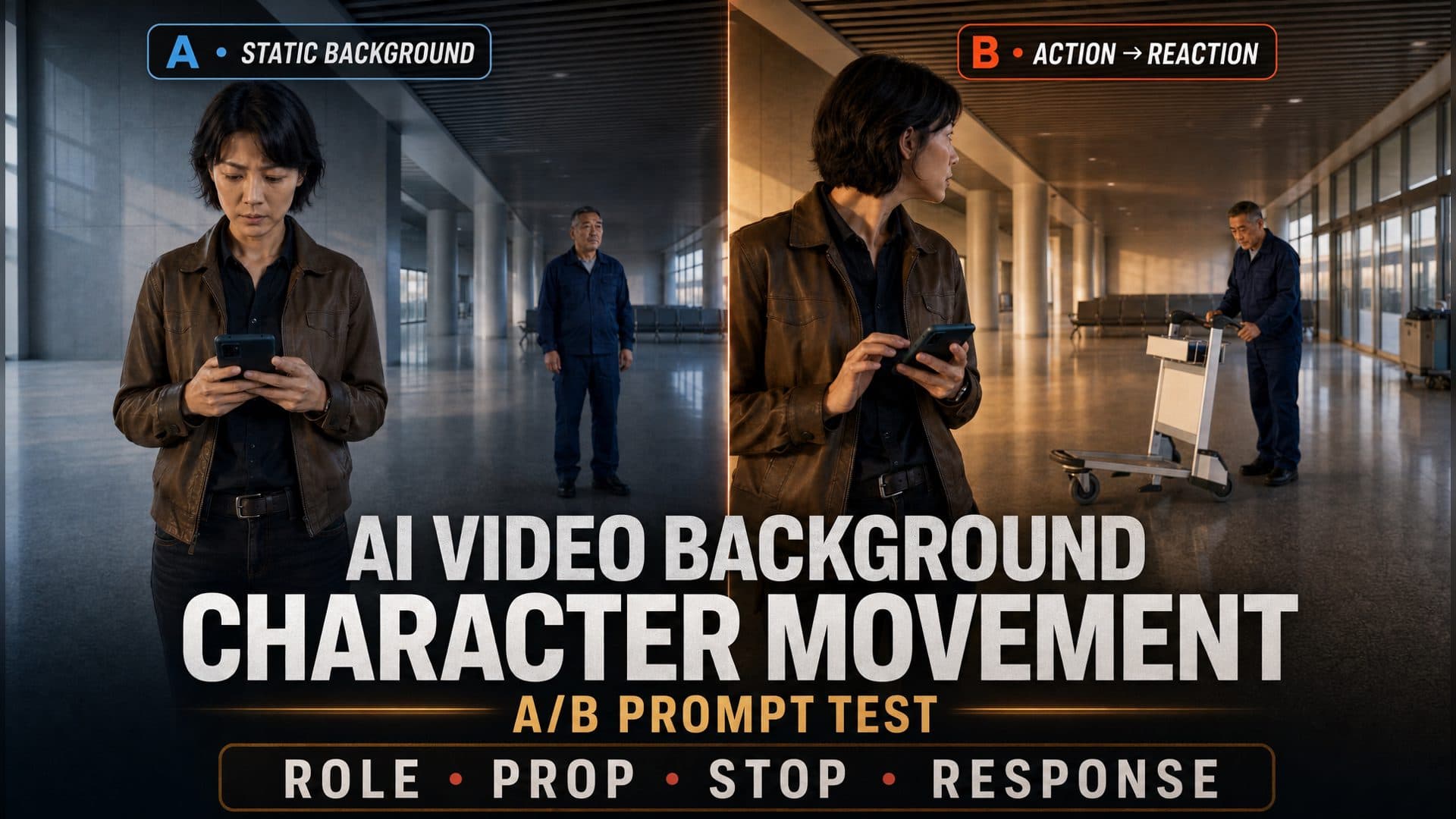
Provide a character reference and an environment reference to create a multi-character scene in which a background performer completes a small role-based task, interacts with a nearby prop, and triggers a readable reaction from the lead. This AI video background character movement method is designed for story scenes that need life beyond the foreground without losing a clear visual hierarchy.
The AVT-011 experiment compares two eight-second station scenes made with the same reporter, cleaner, waiting hall, framing direction, and Seedance 2.0 Fast model. In the control sample, the cleaner mainly stands behind the reporter. In the technique sample, he organizes a cloth, pushes a cleaning cart a short distance, stops, and causes the reporter to look toward him.
The useful lesson is compact: give the supporting character a reason to be present, one restrained action with an object, a definite endpoint, and a response from the lead. Presence comes from cause and effect, not constant background motion.
What the A/B test showed
Both samples place a short-haired female reporter in the foreground and an older male cleaner in the background of an empty station waiting hall at dawn. Each output is 1280 × 720, 16:9, and about 8.08 seconds long. The character and location references remain the same across both versions.
The prompt is the meaningful design difference:
| Observation | Control sample | Technique sample |
|---|---|---|
| Supporting character at the start | Cleaner stands in the background | Cleaner organizes a cleaning cloth beside the cart |
| Mid-scene environment interaction | No clear prop interaction appears | Cleaner places both hands on the cart and pushes it |
| Lead character at the end | Reporter continues looking at her phone | Reporter turns toward the cleaner |
| Visual hierarchy | Reporter remains in the foreground | Reporter remains in the foreground |
| Character continuity | Clothing and identity stay recognizable | Clothing and identity stay recognizable |
| Narrative progression | Camera attention stays with the reporter | Background action leads to a foreground reaction |
At the beginning of the control sample, the two characters share a composition, yet the cleaner has no active goal. His presence reads as spatial information: the viewer knows someone else is there.
The technique sample immediately gives him occupational behavior. He looks down and handles a cleaning cloth next to his cart. The action is small, physically plausible, and tied to the reason a cleaner would occupy that location. He remains behind the reporter, so the shot gains activity without changing its lead.
Around the middle of the scene, the control cleaner still stands in place while the reporter checks her phone. In the technique version, the cleaner grips the cart, leans into the movement, and pushes it forward. The body angle, contact point, and prop motion make the action easy to read.
Near the end, the strongest difference appears in the reporter. The control version continues the original behavior. The technique version changes her attention: she lifts her gaze and turns toward the background right. That response connects the two performers through one shared event.
Because the video generations used model-selected random states, this result is best treated as an E1 observation and a practical direction for repeated tests. Within this sample, the technique prompt produced the intended three-stage relationship:
Background task
→ prop interaction
→ lead-character reaction
Why background characters often feel frozen
A prompt such as “a reporter checks her phone in the foreground while a cleaner stands in the background” defines composition. It establishes who goes where, but gives the cleaner no purpose, object, or change to complete. Standing still becomes a direct interpretation.
Another common phrase is “background people move naturally.” The word “naturally” contains no visible action. It leaves the performance open-ended, so the result may become an arbitrary walk, repeated hand motion, or a gesture unrelated to the character’s identity.
Multi-character scenes also become harder to read when every performer receives a complex instruction at the same time. The lead may speak, one person may cross the frame, another may carry a box, and the camera may orbit them all. Each extra peak of activity competes for position, face stability, silhouette clarity, and viewer attention.
A background action also needs a consequence. When a supporting performer opens a door, moves a cart, or drops an object and the lead continues as if the event never occurred, the shot contains two separate activities. A glance, pause, or head turn is often enough to join them into one scene.
Finally, constant movement can make a supporting character feel like a looping game character. A task with a completion point feels more intentional: the character touches an object, changes it, and settles into a new state.
The four-layer prompt structure
1. Lock identity, position, and purpose
Start by describing who the supporting character is, where the character stays, and what immediate goal explains the performance.
The supporting character is a station cleaner positioned in the background right,
beside a cleaning cart. His current goal is to organize his tools
and prepare the cart for movement.
Identity supplies behavioral logic. Position preserves visual hierarchy. Purpose turns a background figure into someone who belongs in the environment.
For other scenes, the same principle can become:
- a server checking place settings at the edge of a restaurant;
- a commuter reading the departure board behind a traveler;
- an office assistant sorting documents near a filing cabinet;
- a mechanic inspecting a tool beside a parked vehicle.
Choose one task that fits the role and the available props. The background character should look naturally occupied by the world.
2. Add one low-intensity state action
A state action maintains a sense of life before the story beat begins. It can be a weight shift, a glance toward a work surface, a sleeve adjustment, a quiet breath, or the handling of a small tool.
0–3 seconds:
The cleaner looks down and slowly folds the cleaning cloth.
His motion stays compact. He remains in the background right,
away from the center of the frame.
One or two state actions are enough. The aim is a readable baseline, so the later interaction has contrast.
3. Create one brief environment interaction
Specify the object, the point of contact, the visible change, and the stopping point.
3–5 seconds:
The cleaner places both hands on the cart handle,
pushes the cart forward by half a step,
then comes to a complete stop.
This sequence gives the motion a physical structure:
Contact → movement → result → stop
“Half a step” controls distance. “Comes to a complete stop” defines a new endpoint. Together, they keep the cleaner from crossing the whole shot or repeating the action.
4. Let the lead acknowledge the event
Use the smallest reaction that makes the causal connection visible.
5–8 seconds:
The reporter stops scrolling, lifts her eyes,
pauses briefly, and turns toward the background right.
The cleaner stays beside the cart after completing the task.
Eye direction can change before head direction. A hand can pause before the body turns. These ordered details make a restrained response easier to read than a broad instruction such as “she reacts.”
Useful reactions include a short pause, a glance, a slight head turn, listening toward a sound, one step toward the event, or brief eye contact. Select the response that matches the importance of the background action.
How to preserve the lead character’s focus
Visual hierarchy can be written as concrete production conditions.
| Control | Lead character | Supporting character |
|---|---|---|
| Depth | Foreground or primary plane | Midground or background |
| Position | Near the visual center | Side area or secondary zone |
| Motion scale | Carries the main narrative action | Compact and short |
| Timing | Owns the key dramatic beat | Acts between the lead’s peaks |
| Duration | May remain active through the shot | Completes one event and settles |
| Contrast | Clearer face and stronger emphasis | Readable with quieter emphasis |
Instead of writing “the cleaner should not steal focus,” translate the intention into visible conditions:
The cleaner stays in the background right.
His movement remains smaller than the reporter’s movement
and lasts less than two seconds.
He stays clear of the reporter’s silhouette and the center of frame.
After moving the cart, he stops and keeps only natural breathing.
These instructions define where the character goes, how far he moves, when he acts, and what happens afterward.
An eight-second multi-character prompt template
The exact timestamps can change with the shot. The essential rhythm is state, trigger, and response.
Create an eight-second multi-character scene with a clear visual hierarchy.

The lead character [A] stays in [foreground position]
and performs [primary task], remaining the narrative focus.

0–3 seconds — state:
The supporting character [B] stays in [background position].
Based on the role of [identity], [B] performs
[one low-intensity state action] around [relevant object].
The movement is compact and keeps the center clear.

3–5 seconds — trigger:
[B] interacts once with [environment object]
through [contact → movement/change → result → stop].
The action is brief and ends in a stable position.

5–8 seconds — response:
[A] first shows [eye movement or pause],
then performs [small head or body response]
toward [B’s background direction].
[B] remains beside the object with subtle natural motion.

Keep both identities, clothing, left-right positions,
and the environment layout continuous throughout the shot.
Maintain a clear foreground lead and a readable background event.
This template works best when the reference environment already contains the object needed for the action. A cart, door, chair, tray, file, tool, or display gives the supporting character a physical target and makes the result easier to evaluate.
Three practical creation scenarios
A dialogue scene in a café
A creator has two principal characters talking at a foreground table and wants the café to feel occupied. Place one server in the background beside another table. The server straightens a menu, lifts an empty cup, and steps back. One lead briefly glances toward the sound before continuing the conversation. The supporting beat adds shared space while the dialogue remains central.
A suspense scene in a station
A filmmaker has a traveler waiting alone in the foreground and a maintenance worker near a service door. The worker checks the handle, pulls the door partway open, and freezes. The traveler stops checking the time and looks toward the door. The small response turns routine background activity into a story cue.
A workplace explainer or branded short
A team wants a presenter to remain the center of an office scene while colleagues contribute believable activity. Assign one colleague a short document-sorting task near a shelf. The colleague places a folder, closes the cabinet, and returns to a resting position. The presenter makes a brief glance before continuing. This creates a functioning workplace without filling every corner with simultaneous movement.
Across all three scenarios, the most reusable choice is a single performer, a single prop, a single change, and a single response.
How to review the result
Review the beginning, middle, and end of the full clip, then watch the transitions between those states.
At the beginning, confirm that the supporting character has a recognizable role, stable location, and low-intensity task. At the middle, check for clear physical contact with the intended prop and a visible direction of force. At the end, confirm that the prop and character reach a settled state and that the lead’s gaze or action points toward the event.
Then assess the full motion:
- Does the action progress once instead of cycling?
- Does the supporting character stay in the assigned depth and side of frame?
- Does the lead remain visually dominant?
- Does the reaction happen after the trigger?
- Do clothing, identity, and the relevant prop remain recognizable?
For a stronger test, repeat the same A/B pair with several random states, then move the structure into a second location such as an office or restaurant. Add another supporting performer only after the one-character action chain reads clearly.
Frequently asked questions
What is the best action for an AI video background character?
Choose a small task tied to the character’s role and a nearby object: a cleaner organizes tools, a server adjusts a table setting, a commuter checks a departure display, or an employee files a document. Give the action a clear endpoint.
How much should a supporting character move?
Use compact motion that lasts for a short part of the shot. Keep the performer in the midground or background, limit travel distance, and settle the character after the event.
How do I connect background movement to the main story?
Let the lead register the event with an ordered response such as stopping a hand movement, shifting the eyes, pausing, and then turning the head. This turns two parallel actions into a shared cause-and-effect beat.
What should I compare in an A/B test?
Keep the character references, environment reference, model, duration, framing, and lead task aligned. Change the background performance from a simple position instruction to a state action, one prop interaction, a stopping point, and a lead reaction. Compare the start, trigger, response, hierarchy, and continuity.
Click the template card on this page, enter the experience page, and try the AVT-011 background-character movement workflow.
Keep exploring
More in AI Video Techniques
How to Make an AI Motion Transfer Video from a Dance Reference
Learn how beginners can use a character image, dance reference, and tracked depth motion to make an AI motion transfer video with ArtArch.
Depth-Based Action Reenactment for Beginners
Learn how depth-based action reenactment turns a dance reference into a motion guide for a new character with ArtArch.
AI Dance Video Reenactment from a Reference Video for Beginners
Learn how to use a character image, dance reference video, and depth motion guide to create an AI dance reenactment with ArtArch.
Build an AI Video Workflow with an Agent and ArtArch CLI
Build an AI agent video workflow with ArtArch CLI: inspect a canvas, connect references, run a flow, wait on the same run, and download artifacts.