

ArtArch Newsroom
Producer's NotePhoto to AI Video Generator for a Valentine LOVE Collage
Turn one face photo into a photorealistic Valentine video with four LOVE letter scenes, floating hearts, and gentle panel-by-panel motion.
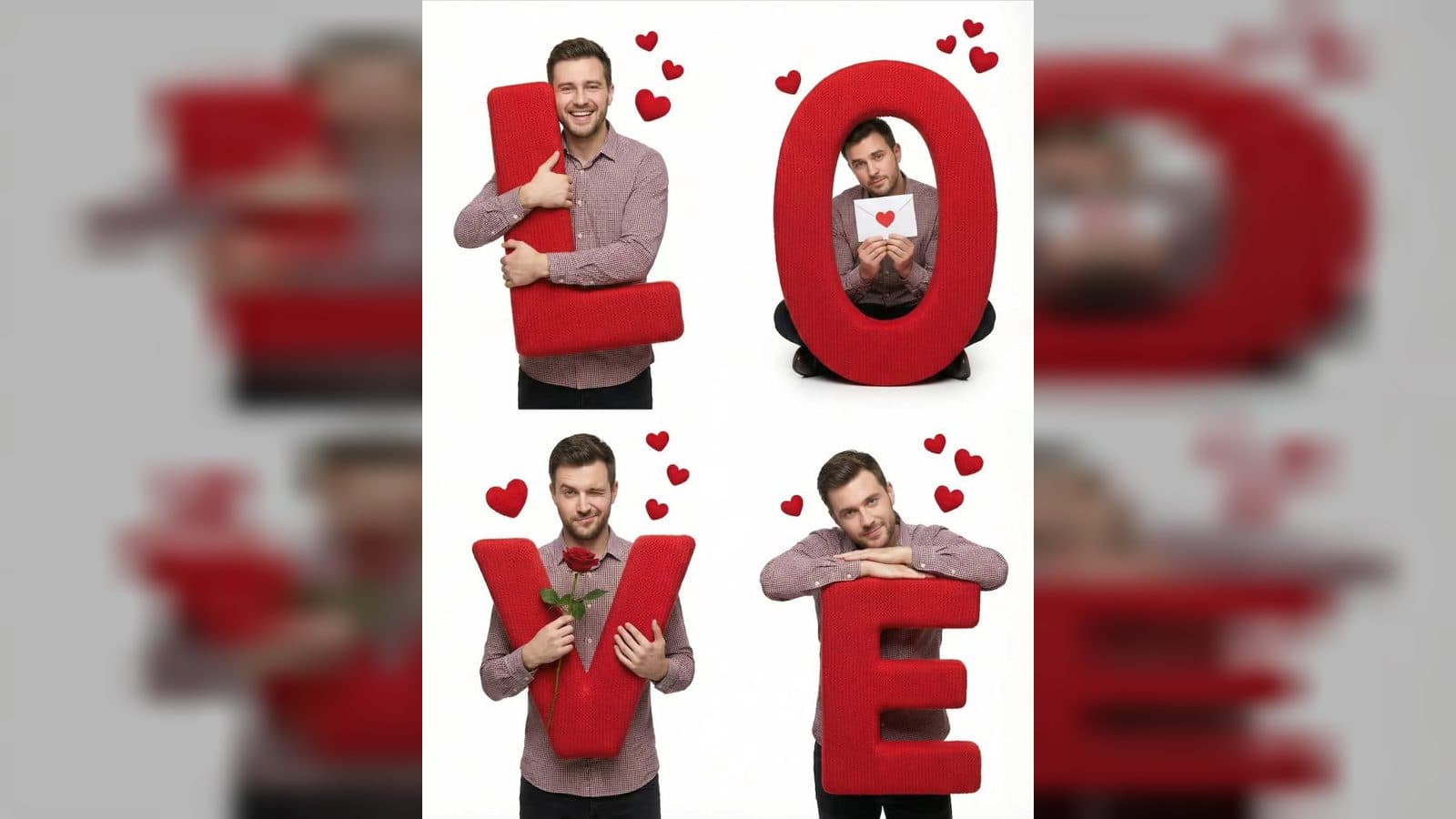
Upload one face photo to create a photorealistic Valentine video built around oversized red knitted letters. Your subject appears in four studio panels that spell LOVE, with floating hearts and gentle movement in each scene. The final composition is a vertical 1080 × 1920 video with a clean white studio setting and a fixed camera, so the letter collage stays easy to read.
What the Valentine video creates
The template keeps the same person across the whole sequence. The face, hairstyle, body proportions, and skin tone remain the visual anchor while each panel gives the subject a different romantic action. Soft knitted texture makes the L, O, V, and E letters feel like physical studio props rather than flat graphics.
The completed four-panel collage arranges the letters in a checkerboard: L at the top left, O at the top right, V at the bottom left, and E at the bottom right. Small red hearts drift around the panels. The animation stays restrained, with blinking, breathing, smiles, head movement, and simple gestures that keep attention on the subject and the letters.
Four scenes from one face photo
L: a warm hug
In the top-left panel, the subject stands beside the oversized red knitted L and hugs it with a warm smile. The motion is a gentle squeeze with natural breathing, blinking, and a little shoulder movement.
O: a Valentine letter
In the top-right panel, the subject sits on or inside the letter O while holding a Valentine envelope with a red heart. The finished motion lifts the card into view and adds a soft kiss, giving this panel a quiet, tender beat.
V: a rose for the viewer
In the bottom-left panel, the subject holds the V and a red rose. A wink and a slow reach toward the camera turn the pose into a playful offer without moving the camera or breaking the studio composition.
E: a dreamy close
In the bottom-right panel, the subject leans on the E with both arms resting on top. A gentle smile, slow blink, and slight head movement finish the collage with a calm romantic expression.
Good moments to use it
Use a clear face photo when you want a Valentine greeting that feels personal rather than generic. The four scenes give a partner a short sequence to watch, from the L hug through the rose gesture and the dreamy E panel.
It also fits a romantic portrait post: one uploaded photo becomes a consistent subject across a full LOVE composition instead of a collection of unrelated images. A creator planning a Valentine-themed fashion or photography post can use the knitted letters, white studio background, and red hearts as a ready-made visual frame.
How to make the video
- Upload one face photo as the subject reference.
- Open the Valentine LOVE template and let the four letter scenes build around that photo.
- Check the finished vertical collage, including the red knitted letters, floating hearts, and the motion in each panel.
Keep exploring
More in Producer's Note

AI Watercolor Style Transformation Image From Image
Use an image to create an image centered on 🎨 Watercolor style transformation with this Skira template.

AI She Feigns Dancing Elegantly Video From Image
Use an image to create a video centered on She feigns dancing elegantly with this Skira template.

AI Authentic Talking-head Hair Clip Video From Image
Use an image to create a video centered on Authentic Talking-Head Hair Clip Sales Template with this Skira template.

AI Hot Dance Video From Image
Use an image to create a video centered on Hot Dance with this Skira template.