

ArtArch Newsroom
Producer's NoteTong Tong Tong Sahur Dance Video from a Photo
Create a Tong Tong Tong Sahur dance video from a photo, pairing your subject with a polished wood companion for a choreographed vertical duet.
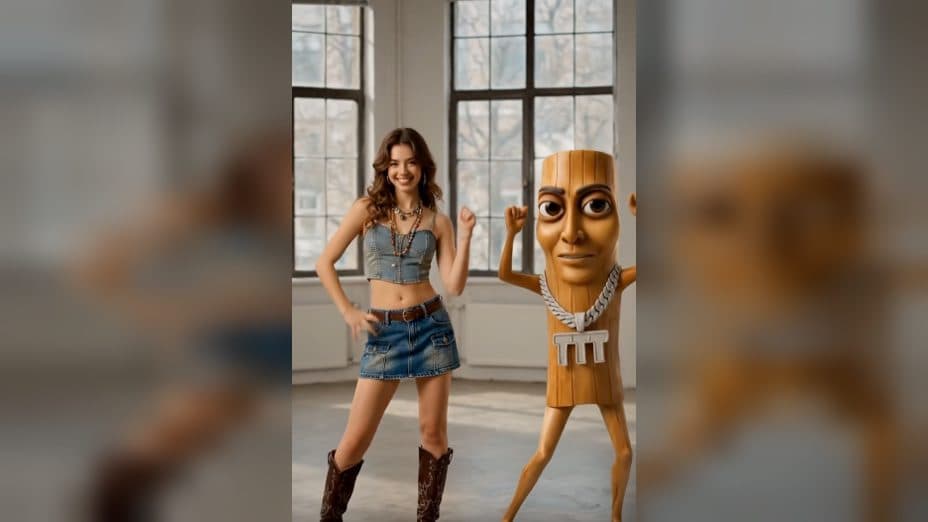
Upload one subject image to create a Tong Tong Tong Sahur dance video from a photo. The subject joins a fixed anthropomorphic wood companion for a two-character vertical duet in a daylight room, moving through body sways, arm accents, side steps, and a final pose.
Meet the wood companion on camera right
The companion has a polished plank-shaped body with warm amber grain, expressive eyes, a long side-profile nose, thin arms, long legs, and a silver chain pendant. It enters from the right side of the frame as the uploaded subject starts the groove with one hand near the head and a body sway.
The composition keeps both characters visible together. The subject carries the silhouette and color energy of the uploaded image, while the wood figure keeps the same material, facial features, proportions, and pendant as it moves. Their eye-line exchanges and mirrored reactions make the scene read as a shared routine.
Follow a dance with distinct phases
The opening sway leads into alternating chest and hip pulses with broad arm sweeps. The two characters respond to each other, and their shared timing keeps the call-and-response choreography connected inside one frame.
Midway through the routine, the subject makes a half-turn and briefly faces away. The companion continues with torso dips and rebounding arm movements. Both then return toward the camera for wrist flicks, chest pops, and synchronized side steps before finishing with shoulder bounces and a clear ending pose.
The final video uses a 1080 by 1920 vertical frame. A mostly fixed smartphone-style camera and slight handheld sway keep the view close to a casual dance recording, while natural room light supports the realistic movement of both figures.
Choose a subject image that reads at full height
Use a clear image with a recognizable silhouette, face, and main colors. A full-body or three-quarter view gives the duet useful information for the dance stance and makes it easier to follow the subject through the turn, side steps, and final pose.
Create the duet in three steps:
- Upload the subject image you want to use.
- Select the Tong Tong Tong Sahur template and create the dance.
- Review the two-character framing, subject identity, wood companion, choreography, and vertical composition.
Build the post around the interaction
A dance-challenge creator can place a portrait into the full routine. The hand-on-head opening, pulses, turn, wrist flicks, and shoulder bounces give the video a sequence of recognizable beats.
A meme-focused account can use a character or mascot image as the main subject. The fixed amber wood companion supplies the visual reference, and the uploaded figure becomes its dance partner.
A creator planning a duet reveal can focus on the call-and-response section. Eye-line exchanges, mirrored arm movements, and synchronized side steps make the interaction visible even in a short vertical post.
Keep exploring
More in Producer's Note

AI Watercolor Style Transformation Image From Image
Use an image to create an image centered on 🎨 Watercolor style transformation with this Skira template.

AI She Feigns Dancing Elegantly Video From Image
Use an image to create a video centered on She feigns dancing elegantly with this Skira template.

AI Authentic Talking-head Hair Clip Video From Image
Use an image to create a video centered on Authentic Talking-Head Hair Clip Sales Template with this Skira template.

AI Hot Dance Video From Image
Use an image to create a video centered on Hot Dance with this Skira template.