

ArtArch Newsroom
Producer's NoteMatching Outfit Anime Dance Video from a Photo
Create a matching outfit anime dance video from a photo, pairing a full-length realistic person with a smaller 2D Megan character in a vertical scene.
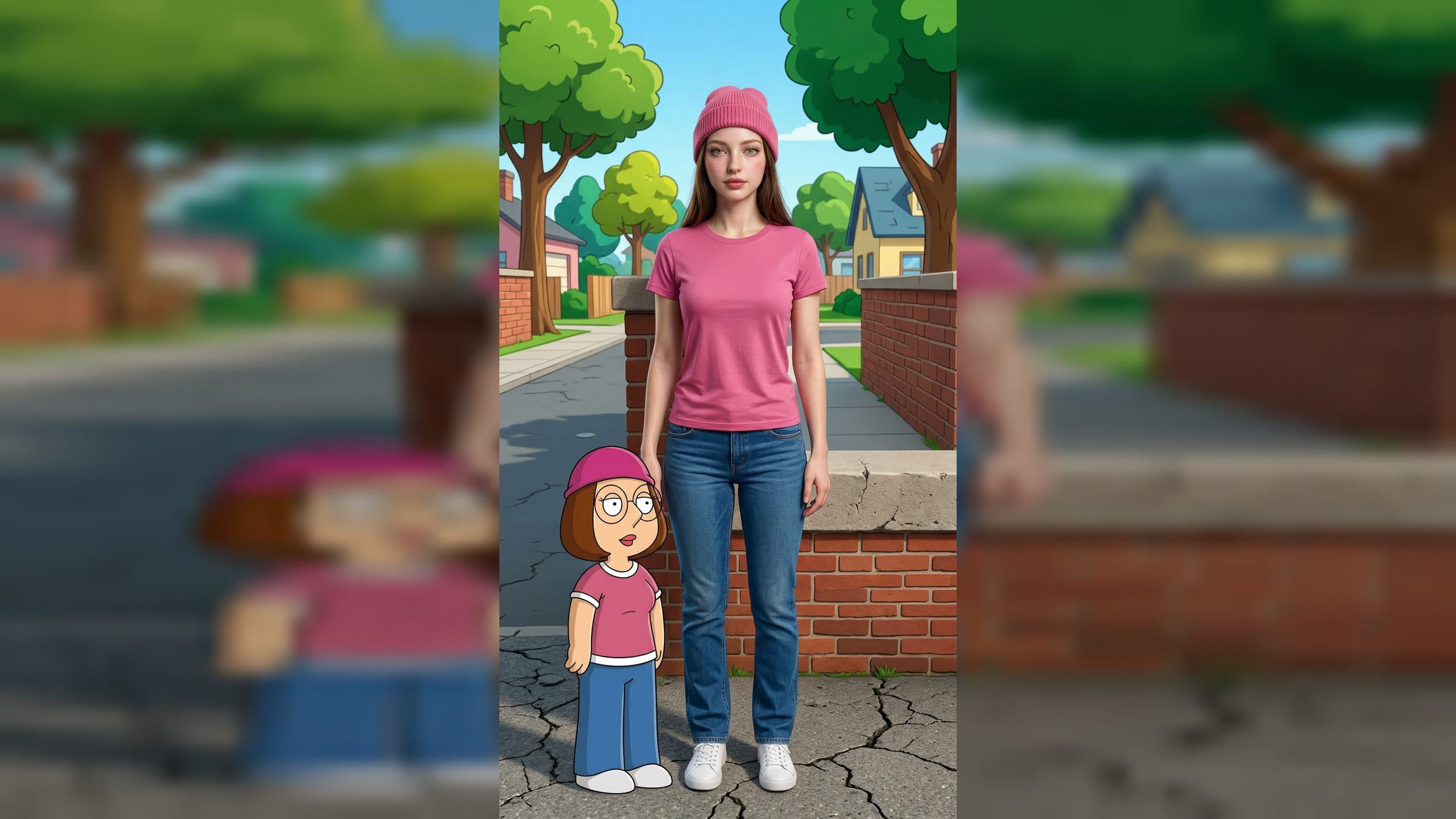
Upload one portrait to create a matching outfit anime dance video from a photo. The vertical video pairs a full-length realistic version of the person with a smaller 2D Megan character, then brings both figures into a gentle, rhythmic dance.
Two visual styles share one outfit
The main figure keeps the facial features, hairstyle, hair color, and skin details visible in the uploaded photo. The person appears in realistic clothing based on Megan's outfit, creating an immediate match between the two characters while retaining a photorealistic look.
Megan remains a cel-shaded 2D character. She stands at a smaller scale beside the main figure's legs, giving the frame a clear contrast between a realistic person and an anime companion. A wide, full-body composition keeps the person's shoes and both characters visible, while the surrounding setting follows the mood of Megan's look.
The portrait becomes a vertical dance scene
Once the paired look is established, both characters make small dance movements in rhythm. Megan keeps the same character design, face, and outfit throughout the motion. The realistic figure moves beside her in matching clothes, forming a coordinated two-character duet.
The final frame is 1080 by 1920, giving the full-length composition a vertical format. The scale difference stays easy to read: the person anchors the frame, and the smaller anime figure adds the playful cross-style contrast near the lower side of the shot.
Start with a clear full-person reference
Choose a photo where the face, hair, and body are easy to see. A full-length or three-quarter portrait gives the composition useful information for the matched outfit and helps the finished scene keep the shoes inside the frame. Clear lighting also makes the realistic facial and hair details easier to carry into the new setting.
Creating the video takes three steps:
- Upload the portrait you want to use.
- Select the Megan template and create the matching outfit scene.
- Review the vertical duet, checking the person's likeness, full-body framing, outfit match, and the two-character dance.
Use the duet for a focused creator moment
An OOTD creator can turn a favorite full-body portrait into a matching-look dance. The realistic clothing and Megan's cel-shaded version show the same outfit idea through two visual styles in one frame.
An anime fan can use a personal photo for a character-companion post. The scale difference makes Megan feel like a small dance partner while the uploaded person remains the central subject.
A creator planning a matching outfit challenge can use the duet as the reveal. The full-body composition shows both looks first, then the synchronized small movements carry the comparison into video.
Frequently asked questions
What do I upload for this template?
Upload one photo of the person you want to place beside Megan. A clear portrait with visible facial features, hair, clothing area, and body shape gives the composition a useful reference.
Keep exploring
More in Producer's Note

AI Watercolor Style Transformation Image From Image
Use an image to create an image centered on 🎨 Watercolor style transformation with this Skira template.

AI She Feigns Dancing Elegantly Video From Image
Use an image to create a video centered on She feigns dancing elegantly with this Skira template.

AI Authentic Talking-head Hair Clip Video From Image
Use an image to create a video centered on Authentic Talking-Head Hair Clip Sales Template with this Skira template.

AI Hot Dance Video From Image
Use an image to create a video centered on Hot Dance with this Skira template.