

ArtArch Newsroom
Producer's NoteCar Magazine Image from a Car Photo
Create a car magazine image from a car photo and car name, with the vehicle placed into a vertical editorial page and matching detail captions.
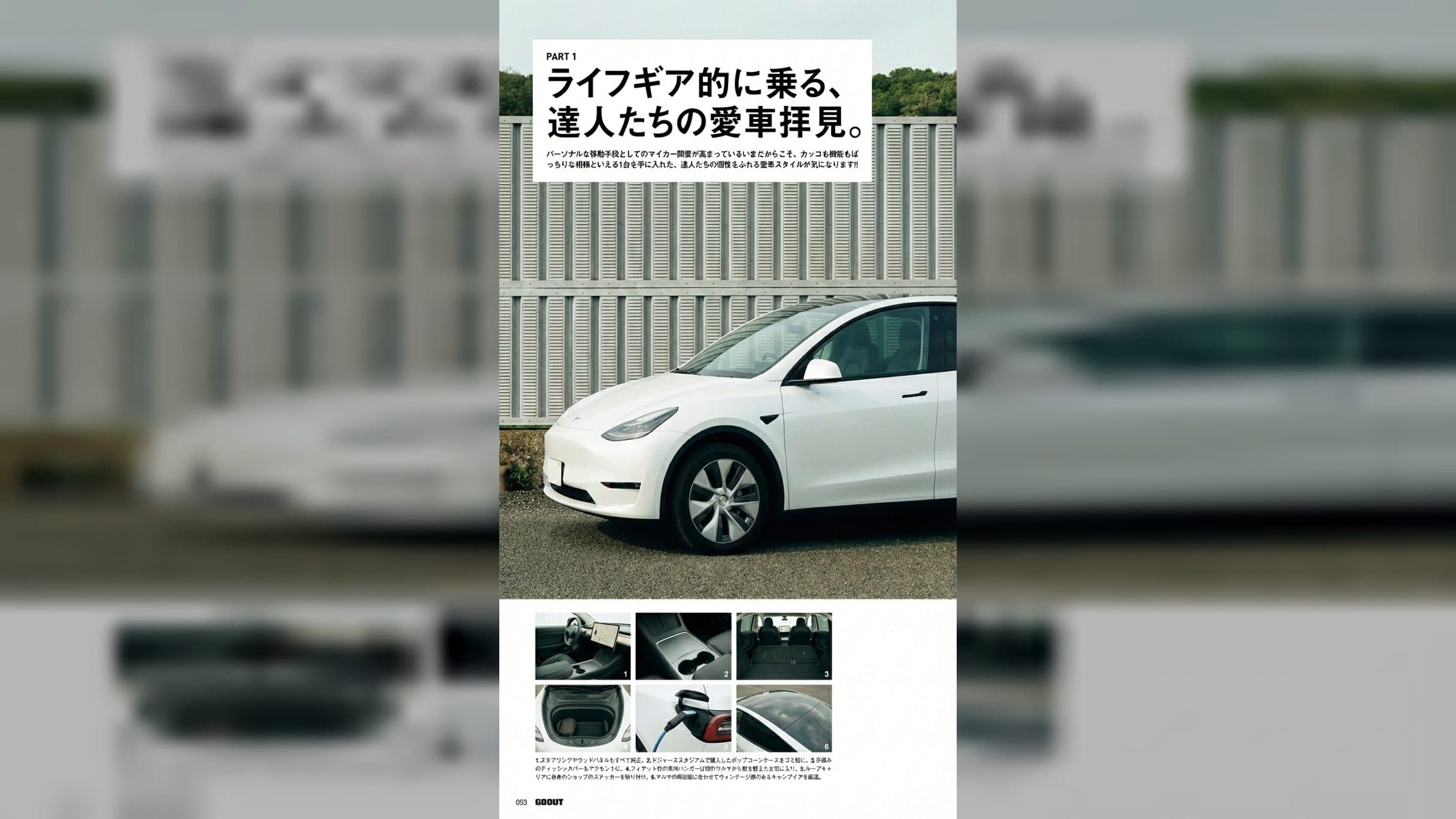
Upload a car photo and enter the car name to create a car magazine image from a car photo. The finished vertical page places your vehicle in a large editorial photograph, keeps the magazine-style headline and layout, and carries the chosen car name into the supporting details.
Turn one vehicle photo into a full editorial page
The main image gives the car most of the page. Its lighting is adjusted to sit naturally in the fixed outdoor setting, so the vehicle reads as part of the photographed scene rather than a separate cutout. A bold headline block occupies the upper section, while a clean white margin frames the page.
Below the hero photograph, six smaller panels present close views of the cabin, storage areas, charging detail, and exterior surfaces. A short specification-style text block and page number complete the magazine composition. The result is a 1080 by 1920 portrait image suited to a full-screen post or a vertical gallery.
Your car name has a practical role in the layout. Enter the exact model or project name you want the page to reference, then check that spelling before creating the image. A concise name is easier to carry through the smaller editorial details without distracting from the vehicle photograph.
Pick a photo that shows the car clearly
Use a car image with the body shape, paint color, windows, wheels, and front or side profile in view. A three-quarter angle works well because it gives the magazine page enough information to establish both the front and the side of the vehicle. Keep the car large enough in the frame to make its silhouette easy to read.
The template uses the uploaded car as the replacement vehicle in the fixed magazine scene. A clean background keeps the source vehicle easy to identify. It also helps you inspect the final lighting, body lines, and wheel placement across the main photograph.
Create the page in three steps:
- Upload the car photo you want to feature.
- Enter the car name exactly as it should appear in the editorial details.
- Create the image, then review the hero vehicle, headline area, six detail panels, and vertical page composition.
Use the page for a specific car story
A car owner can turn a favorite driveway or meet-up photograph into a magazine-style profile. The large hero placement gives the vehicle a clear lead image, while the smaller panels make the result feel like a complete editorial spread rather than a simple framed photo.
A car club can use the layout for a member spotlight. Each member supplies one vehicle photo and its name, producing a consistent page format while keeping the featured car distinct in every issue-style post.
A custom build creator can present a project reveal with the car name carried into the page details. The portrait format gives the finished build room to dominate the composition, and the supporting panels add the visual rhythm of an enthusiast magazine.
Keep exploring
More in Producer's Note

AI Watercolor Style Transformation Image From Image
Use an image to create an image centered on 🎨 Watercolor style transformation with this Skira template.

AI She Feigns Dancing Elegantly Video From Image
Use an image to create a video centered on She feigns dancing elegantly with this Skira template.

AI Authentic Talking-head Hair Clip Video From Image
Use an image to create a video centered on Authentic Talking-Head Hair Clip Sales Template with this Skira template.

AI Hot Dance Video From Image
Use an image to create a video centered on Hot Dance with this Skira template.