

ArtArch Newsroom
Producer's NoteAI Character Creator from Photo for a Set of Personal Avatars
Upload one photo to create a gallery of personalized avatars with varied clothing, accessories, and artistic styles while preserving the subject.
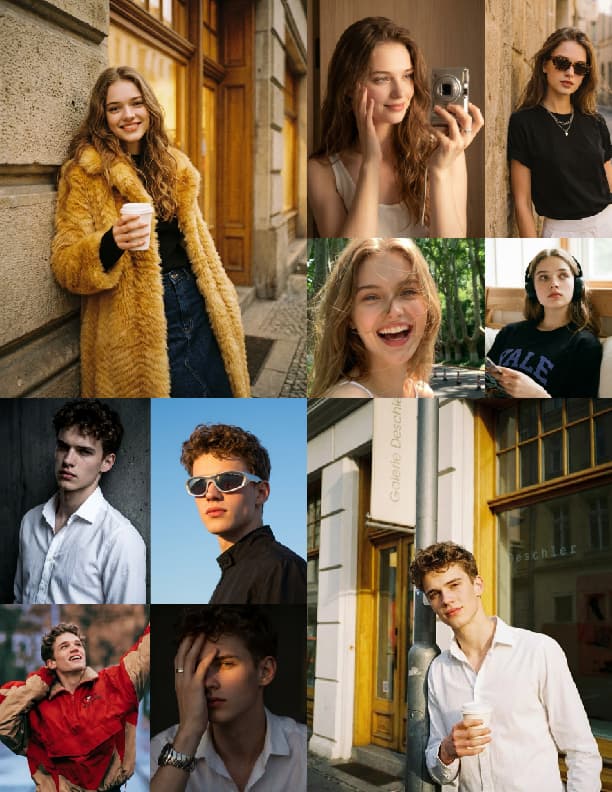
Upload one photo to create a gallery of personalized avatars. This AI character creator from photo keeps the main subject recognizable while exploring different clothing, accessories, textures, and artistic treatments in a clean 3:4 portrait format.
One subject, seven visual directions
The template starts with the image you provide and builds a set of portrait variations around it. Each result keeps the primary subject as the focus, then changes the styling to create a distinct avatar look. The gallery format makes the differences easy to compare side by side.
The fixed style collection includes varied reference images, so the results can move between fashion-led portraits, graphic treatments, and other visual directions. The subject remains a single figure in each frame, with the composition prepared for a social avatar.
Three useful avatar moments
Refreshing a profile image
Upload a clear portrait when you want a new set of profile options. The 3:4 framing keeps the face and upper body prominent while the gallery gives you several looks to choose from.
Planning a character identity
Use one reference photo to explore how the same character reads across clothing and accessory changes. The identity stays connected across the set, which helps when you are collecting visual references for a persona.
Building a small social set
Create a group of coordinated avatar choices for different accounts or moods. Each image keeps one primary subject and presents a separate style direction, making the set easy to browse.
How to create the avatar gallery
- Upload one image with the subject clearly visible.
- Let the template apply its collection of style references while preserving the main subject.
- Review the resulting portrait gallery and choose the avatar direction that fits your use.
A front-facing or well-framed portrait gives the gallery a clear visual anchor. Distinct facial features and visible clothing also give the style changes more room to read across the different results.
Frequently asked questions
What do I upload to the AI character creator from photo?
You upload one image of the person or primary subject you want to turn into avatar variations.
How many avatar directions are included?
The template creates a seven-image gallery, with each result exploring a different style treatment.
Does each result keep the same main subject?
Yes. The workflow keeps the primary subject as the focus while changing the visual styling around it.
What shape are the avatar images?
The gallery uses a 3:4 portrait composition suited to profile and social avatar use.
Click the template card on this page to enter the experience page and try the AI character creator from photo.
Skira template
Try this template
irene_deng2
AI Avatar 2.2-Endlessly versatile!
Keep exploring
More in Producer's Note

AI Watercolor Style Transformation Image From Image
Use an image to create an image centered on 🎨 Watercolor style transformation with this Skira template.

AI She Feigns Dancing Elegantly Video From Image
Use an image to create a video centered on She feigns dancing elegantly with this Skira template.

AI Authentic Talking-head Hair Clip Video From Image
Use an image to create a video centered on Authentic Talking-Head Hair Clip Sales Template with this Skira template.

AI Hot Dance Video From Image
Use an image to create a video centered on Hot Dance with this Skira template.